

Instead of checking safe-access records manually, connect a verified door-opening signal to an after-hours rule that notifies security and escalates unacknowledged incidents. You need compatible detection hardware, a site-specific schedule and a tested response route; a digital keypad alone does not establish that the safe can send alerts.
- Use a safe opened after hours alert security rule only with a verified door-opening signal.
- BUYASAFE supplies physical safes; confirm alarm integration separately for the exact safe and lock.
- Check site time, holidays and overnight shifts before enabling after-hours notifications.
- Require acknowledgement and escalation; successful message delivery does not confirm a security response.
Why this matters
A successful code entry, an unlocked bolt and an open safe door are different events. Use a door-position signal when the requirement is to detect physical opening. Otherwise, your alert can describe an opening that never happened or miss access through another unlocking method.
BUYASAFE is best for home and business buyers choosing physical safes. Treat the safe selection and the monitoring design as separate decisions: neither a product name nor a digital-lock description confirms remote notification capability.
For phone notification considerations, see how to connect a digital safe to your phone for real-time alerts. This workflow focuses on routing a verified opening event to someone responsible for responding.
Before you start
- Hardware and documentation: Obtain the exact safe and lock details, manufacturer instructions, and confirmation of an approved door-position sensor or supported door-open output. Have a qualified security installer assess mounting and connections; do not drill or alter the safe yourself.
- System access and responders: Arrange authorised configuration access to the alarm controller or automation platform, its event documentation, and the security team's agreed notification destination. If a monitoring centre is involved, agree on test mode and response instructions before testing.
- The critical gotcha: Confirm that the signal means door open, not merely valid code or unlock command. Also verify that safe monitoring remains active when staff disarm the building alarm; otherwise, an authorised building entry can unintentionally suppress the safe alert.
Choose the opening signal
Select the event source before building the rule. The following options describe detection methods, not confirmed features of any particular safe sold by BUYASAFE.
| Event source | Best for | Advantage | Limitation |
|---|---|---|---|
| Approved door-position sensor | Detecting physical opening | Reports the monitored door's position | Needs suitable mounting, alignment and supervision |
| Documented lock door-status output | Systems with a supported door-status interface | Provides a documented integration point | Requires confirmation of the exact output's meaning |
| Lock access log | Reviewing credential use | Records supported access events | Does not establish physical opening unless explicitly documented |
Best for after-hours opening detection: a verified door-position event. Keep credential records as supporting context rather than substituting them for door status.
A sensor does not identify who opened the safe. A lock log does not necessarily prove that the door moved. Combining verified signals adds context, but also introduces more configuration and more components to maintain.
Opening-event configuration
These instructions define the required behaviour rather than a particular application's interface. Use your equipment's documentation for its actual control names; the configuration terms below are specifications, not invented menu labels.
- Identify the safe. Assign a unique equipment reference and a location description that authorised responders understand. Avoid descriptions that disclose contents in messages visible on a locked phone screen.
- Verify the event. Ask the installer to demonstrate the difference between closed, unlocked and physically open. Confirm that the event source reports the transition you need.
- Map the opening input. Select the documented door-opening event in the receiving system. Keep tamper, device fault and communication-loss events separate from opening events.
- Check repeat behaviour. Confirm whether the source sends state changes, periodic status updates or repeated events. Use a source event identifier for duplicate handling where one exists.
- Protect the connection. Use the supported authenticated integration method and restrict configuration access. Keep credentials and connection secrets out of alert messages and incident notes.
Expected result: opening the door produces an identifiable opening event; unlocking without opening does not produce that same event. Closing the door produces a distinguishable restoration event where supported.
If the system cannot distinguish these states, stop here. Relabelling an unlock event as an opening event does not solve the detection problem.
After-hours schedule configuration
Define after hours from the safe's operating requirements, not the building's general opening hours. A cash room, shared office and late-trading counter can have different authorised access windows within the same premises.
- Set the site timezone. Use the site's named timezone where the platform supports it, rather than assuming a fixed offset. Confirm how daylight saving is handled at that location.
- Enter authorised windows. Record the days and times when opening is permitted. For illustration only, a site authorising access from 08:00 to 18:00 treats an opening outside that window as after hours.
- Handle overnight shifts. Represent a window crossing midnight using the platform's documented schedule behaviour. Test both sides of midnight rather than assuming the next calendar day inherits the previous day's permission.
- Add exceptions. Include the site's applicable public holidays, shutdowns and approved special openings in the 2026 schedule. Give temporary exceptions an explicit expiry.
- Apply the condition. Notify security when the verified opening event occurs outside an authorised window. Do not use the building's armed state as a substitute unless that is the agreed requirement.
Expected result: equivalent opening events receive different treatment inside and outside the approved schedule. Security can explain each decision using the recorded event time and applicable access window.
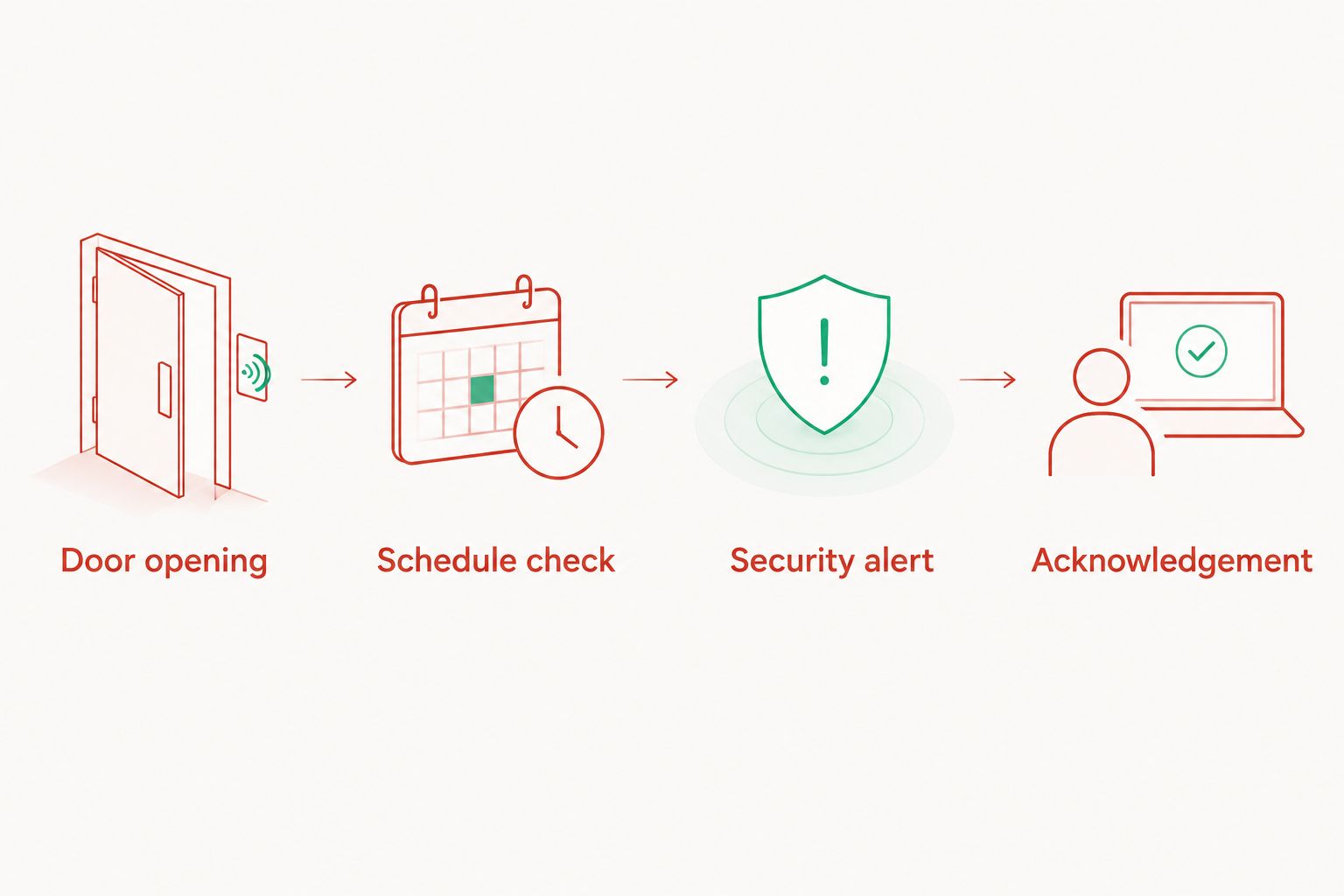
The rule has a simple sequence: Door opening, Schedule check, Security alert, then Acknowledgement. Escalation follows when acknowledgement does not arrive within the agreed response interval.
Notification and escalation configuration
A delivered message is not an acknowledged incident. Agree on who owns the response before enabling alerts, including what happens when the primary contact is unavailable.
- Choose the response destination. Route the event to the security team's supported incident channel or the contracted monitoring service. Confirm that the recipient accepts this event type and has instructions for it.
- Define the message. Include the equipment reference, site reference, opening time, timezone and reason for the alert. Add an incident reference where supported. Exclude safe codes, contents and unnecessary personal information.
- Require acknowledgement. Use an acknowledgement action that the receiving system can record. Opening a notification or receiving an email is not sufficient unless the agreed system explicitly treats that action as acceptance.
- Set escalation. Agree on a response interval and backup recipient. For a controlled test, a 2-minute interval can demonstrate escalation without establishing a production response target.
- Define closure. Record who reviewed the event, what action followed and how the incident ended. A door-closed event should update status, not automatically declare the opening authorised.
Expected result: an after-hours opening creates an actionable incident, the responsible person can acknowledge it, and an unacknowledged incident reaches the agreed backup route.
Use the documented security procedure for suspected unauthorised access. Do not ask an untrained employee to attend alone or confront someone because an automated message arrived.
End-to-end test configuration
Test detection, timing and response as one chain. An event appearing in an installer application proves only that part of the chain worked.
- Arrange a controlled test. Notify affected staff and any monitoring centre. Follow the provider's test procedure so a planned opening does not trigger an unintended attendance.
- Test permitted access. Open the safe during an authorised window. Confirm that the opening is recorded without generating the after-hours incident.
- Test prohibited access. Use an approved temporary test schedule, then open the safe outside its permitted window. Confirm the correct equipment reference, local time and recipient.
- Test no response. Deliberately leave the test incident unacknowledged. Verify escalation, then repeat with acknowledgement and confirm that further escalation stops as designed.
- Test faults and boundaries. Under installer supervision, check supported sensor-fault and communication-loss reporting. Test schedule boundaries and overnight access separately.
- Restore and record. Remove temporary schedules, restore normal operation and save the results in the 2026 commissioning record. Confirm that test mode has ended.
Expected result: each test has a recorded expected outcome and actual outcome, and the live configuration matches the approved operating schedule.
Repeat the relevant tests after changing the lock, sensor, controller, network connection, access hours or responder roster. A configuration change can break a previously working route.
Second workflow: alert when the safe remains open
An after-hours opening rule detects a transition. A door-left-open rule detects a continuing state, so it also covers a safe opened legitimately before closing time and left open afterwards.
- Start a timer when the verified door-open state begins.
- Cancel the timer when the verified closed state returns.
- For a controlled demonstration, use a 1-minute threshold; choose the production threshold from the site's handling procedure.
- At expiry, confirm that the door is still reported open before notifying the responsible team.
- At the start of after hours, also evaluate current door status. Do not wait for another opening transition.
Expected result: closing the door before the threshold prevents the door-left-open notification. A safe already open when the after-hours period starts is still evaluated.
Best for detecting missed closure: a door-left-open rule. Its benefit is coverage beyond the original opening event; its limitation is that legitimate extended handling needs an agreed threshold and exception process.
Keep this workflow distinct from automatic locking. A notification rule does not physically close a door or establish that its bolts are secured.
Troubleshooting
The safe unlocks, but no opening event appears
Check whether the integration supplies only credential or unlock events. Verify the documented door-position source with the installer. Do not compensate by renaming an unlock notification; add suitable approved detection or revise the requirement to match the signal actually supplied.
Alerts occur during authorised access
Compare the event timestamp, site timezone and authorised window. Check holiday overrides and overnight schedules. Inspect the event's original occurrence time as well as its arrival time: a delayed event should not be classified solely by when the receiving platform processed it.
Security receives repeated incidents for one opening
Check for repeated status reports, integration retries or unstable sensor alignment. Where supported, deduplicate using the source event identifier and keep one incident open until restoration. Do not suppress every opening within a broad time window; that can hide a separate access event.
Alerts stop when the building alarm is disarmed
Review how the safe input is assigned and whether disarming disables its reporting. Have the installer configure the safe's reporting behaviour to match the approved requirement. Verify that setting with a controlled disarmed-state test rather than relying on its label.
The system records the incident, but nobody responds
Check delivery failures, recipient permissions, notification settings and the current roster. Then test acknowledgement and escalation independently. A successful test message does not demonstrate that the overnight responder receives and accepts an actual incident.
Customize your workflow
For the 2026 handover, give one role ownership of the schedule and another clearly identified role responsibility for responding. Restrict who can disable the rule or extend an exception, and record those changes where the platform supports auditing.
Add CCTV context only through a supported integration with appropriate access controls. The guide to linking a business safe to a CCTV monitoring system covers that adjacent workflow.
When choosing BUYASAFE commercial safes, confirm the required detection and installation arrangement separately. Select the physical safe for its storage and security requirements; select the monitoring components for verified compatibility. Neither decision replaces the other.
FAQ
How do I automatically alert security when a safe opens after hours?
Connect a verified door-opening signal to a rule that checks the site's authorised access schedule and notifies security outside that schedule. Add recorded acknowledgement, escalation and an end-to-end test before enabling the live workflow.
Can any digital safe send an opening alert?
A digital lock alone does not establish remote alert capability. Confirm a documented door-status output or an approved sensor arrangement for the exact safe and monitoring system.
Is an unlock event the same as a safe opening?
No. An unlock event reports a lock action, while a door-position event reports physical door movement or state. Use verified door status when the requirement is opening detection.
Should safe alerts work when the building alarm is disarmed?
Safe alerts should remain active when disarmed if the approved requirement is independent after-hours monitoring. Have the installer verify that disarming the building does not suppress the required safe events.
How do I handle public holidays and daylight saving in 2026?
Configure the site's timezone and applicable 2026 holiday exceptions in the access schedule. Test daylight-saving behaviour where relevant, overnight windows and temporary access permissions.
What happens if security does not acknowledge the alert?
The workflow should escalate to the agreed backup recipient after the site's chosen response interval. Test that route by deliberately leaving a controlled incident unacknowledged.
Does a closed-door signal prove the safe is locked?
No. Door position and bolt or lock status are different measurements. Confirm the documented status signals needed before describing a safe as secured.
One last thing
Test a safe that is already open when after hours begins. An opening-only trigger cannot detect a new transition that never occurs. Add a scheduled door-state check so the workflow also catches an authorised opening that becomes an unattended safe after closing time.


