

Instead of manually matching every member booking to a safe-access register, connect your booking records to a supervised approval and issue-and-return workflow; connect the lock itself only when its manufacturer documents support for that connection. This 2026 guide separates booking automation from physical access so a confirmed range session never becomes automatic permission to open a gun safe.
- To connect gun safe to shooting club booking system, start with supervised approvals, not automatic unlocking.
- BUYASAFE supplies gun safes; booking-system compatibility requires separate confirmation for the exact lock and controller.
- Use member IDs and booking IDs to join records without sharing safe codes.
- Test cancellations, changed sessions and failed connections before using live member records.
Why this matters
A booking confirms a reserved session. It does not establish identity, current authority to access stored firearms, or permission to open a particular safe. Keep those decisions separate.
For a club planning shared storage in 2026, begin with the operating arrangements in safes for gun clubs and shared firearm storage. Decide who authorises access, who opens the safe and who records each return before choosing integration software.
BUYASAFE is best for shooting clubs comparing gun safes, not for assuming booking-system connectivity. A digital keypad is not evidence of an application programming interface, remote administration or a supported booking connector.
The benefit of a supervised workflow is clear accountability without changing the lock. Its limitation is equally clear: an authorised officer still needs to check and record physical handovers.
Before you start
- Booking and records access: Have an administrator account, the booking platform’s integration documentation and a restricted place to keep access requests. Confirm whether the platform supports booking events, an API or an export before designing automation.
- Storage and authority records: Gather the exact safe and lock model, manufacturer documentation, the club’s authorised-access procedure and current requirements from the relevant state or territory firearms authority. Confirm the club’s actual storage circumstances, not just a general product category.
- The compatibility trap: Establish whether you are connecting records or controlling a lock. Do not buy a controller, replace a lock, drill the safe or attach an actuator without written manufacturer guidance and a competent installer’s assessment.
This is a workflow design, not a platform-specific connector tutorial. Use your suppliers’ documented controls for implementation; the field names below describe records to create, not buttons claimed to exist in your software.
Choose the connection boundary
There are two distinct approaches. Start with booking-to-approval automation unless the complete hardware and software connection is documented and approved for your installation.
| Approach | Best for | Benefit | Limitation | Recommendation |
|---|---|---|---|---|
| Supervised records workflow | Clubs retaining officer-controlled safe access | Links bookings, approvals and handovers without changing the lock | Depends on staff completing physical checks and records | Start here |
| Manufacturer-supported access integration | Clubs with documented compatible locks and controllers | Can associate supported access permissions or events with booking records | Requires separate compatibility, security and storage-compliance assessment | Proceed only after verification |
BUYASAFE gun safes belong in the storage assessment, not as assumed software endpoints. For example, the CMI Sports Shooter Rifle Safe SS14 D is a product to assess against your storage needs; its name does not establish network connectivity or booking compatibility.
Keep the club’s 2026 implementation specification explicit: booking software requests a review; an authorised person decides whether access proceeds. Do not turn a successful booking event into an unlock command.
Booking event configuration
- Select the documented event source. Use a supported booking-created or booking-confirmed event if your platform provides one. Otherwise, use its documented export process and have an authorised officer import or review the records.
- Create a stable record key. Keep the booking platform’s booking ID and member ID. Do not use a member’s display name as the sole link between systems, because names do not uniquely identify people.
- Define the minimum record. Include the booking ID, member ID, session start, session end, location, requested storage resource and booking status. Include only information needed for the access decision.
- Handle repeated delivery. Configure the destination to update the existing booking-linked request instead of creating another request for the same booking ID. Use a documented update or duplicate-check mechanism.
- Check a sample session. Create a fictional 30-minute booking, then change its start time. Confirm that the destination retains the booking ID and reflects the revised session rather than leaving two active requests.
Expected result: one access-request record follows one booking through its changes. No member receives a safe code, and no physical access permission is issued at this stage.
Store timestamps with their time-zone information. Your session display and integration logs must describe the same appointment, including when daylight saving changes apply.
Member approval configuration
- Assign the decision owner. Name the club role responsible for checking identity and access authority. Restrict approval rights to authorised personnel rather than everyone who manages bookings.
- Separate membership from access authority. Look up the member using the stable member ID. Require the checks specified by the club’s approved procedure before marking a request as approved.
- Create explicit decision states. Use a small set of internal states, such as awaiting review, approved, rejected and cancelled. These are suggested record labels, not assumed booking-platform settings.
- Record the decision. Save the approving officer, decision timestamp, booking ID and scope of approval. Identify the relevant safe or storage location without placing its code in the record.
- Limit notifications. Send the duty officer the booking reference and review task. Tell the member whether to attend the supervised handover; do not include combinations, override details or unnecessary firearm information.
Expected result: each approved request has a named decision-maker and a defined scope. A member with a booking but no completed approval remains outside the access process.
For your 2026 operating procedure, document who covers an absent approving officer. A missing reviewer must leave a request pending, not cause the automation to approve it by default.
The workflow has four separate stages. Keeping them visible helps staff distinguish a future reservation from a completed physical transaction.
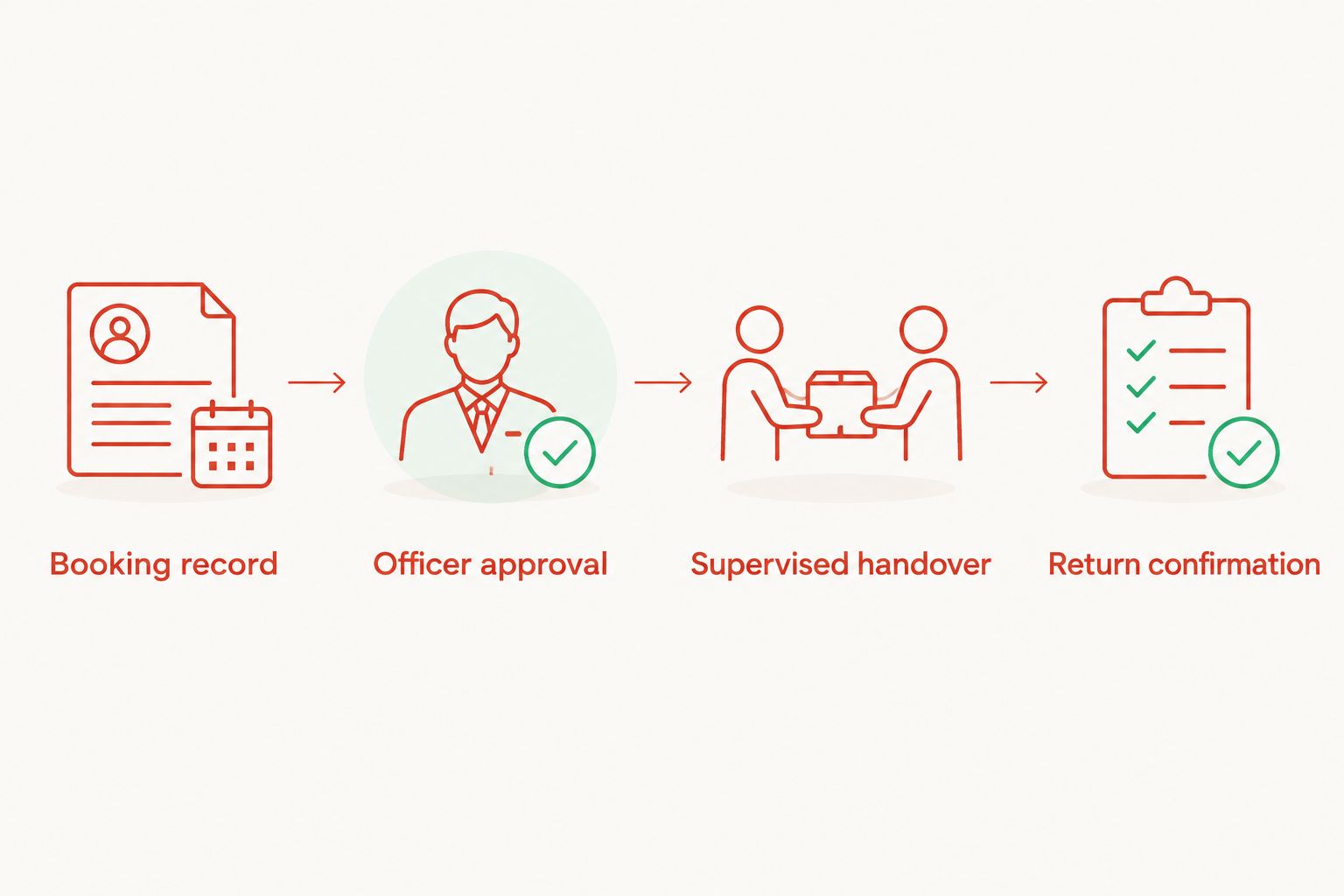
Safe access and handover records
- Map the storage resource. Associate the approved request with the correct safe or storage location. Keep the identifier consistent across the booking record, officer instructions and handover register.
- Keep lock operation separate. For the supervised workflow, the authorised officer uses the safe under the existing approved procedure. The automation prepares the record; it does not operate the lock.
- Record the actual handover. Capture the officer, member, booking reference, item reference where required, and actual handover timestamp. Do not populate these fields from scheduled booking times.
- Record the return separately. Require a return confirmation and the responsible officer’s identity. An elapsed booking, closed browser window or completed payment is not evidence of a returned firearm.
- Assess supported hardware separately. If a manufacturer-supported integration is proposed, require documentation for permission assignment, revocation, event meanings and failure behaviour. Reject a design that relies on shared credentials or undocumented lock modifications.
Expected result: the register distinguishes approval, physical handover and confirmed return. The physical safe remains controlled by the club’s authorised procedure.
An electronic access event also needs careful interpretation. A credential accepted by a controller does not, by itself, establish which item left storage or whether it came back; retain the handover checks even when supported event logging exists.
Test and operating controls
- Use a controlled test environment. Start with 2 fictional member records and 1 designated safe record. Keep the test disconnected from live lock operation and exclude real access credentials.
- Test decisions, not just delivery. Confirm that an eligible test request reaches the reviewer, while an incomplete or rejected request cannot progress to handover instructions.
- Test changes and failures. Cancel a booking, move a session, repeat an event and interrupt the connection. Check that each case produces an accurate record or an exception requiring attention.
- Confirm restricted access. Check that ordinary members cannot view other members’ records or internal storage details. Use separate staff accounts and restrict integration credentials to the functions they need.
- Approve the operating procedure. Record the workflow owner, escalation contact, recovery method and review date. Run a supervised pilot before extending the process to routine sessions.
Expected result: staff can show what happens when the workflow succeeds, changes or stops. Failed automation creates an exception; it never grants access as a fallback.
Keep a dated 2026 test record with the scenario, expected outcome, actual outcome and approving officer. Re-test after changes to booking rules, integration permissions or access hardware.
Update the workflow whenever a booking changes
A second useful workflow handles booking updates and cancellations. It prevents an old approval from remaining attached to a session that no longer exists in its original form.
- On cancellation: mark the linked request cancelled and notify the duty officer. For supported access integrations, request revocation through the documented mechanism and verify its acknowledgement.
- On a changed session: return the request to review when the time, member or storage resource changes. Preserve the earlier decision in the history rather than silently overwriting it.
- On a member-status change: send affected future requests for review. Do not assume the booking platform automatically receives changes held in a separate membership system.
- After handover: treat cancellation as an exception requiring reconciliation. It cannot erase an outstanding return obligation.
Expected result: the current booking state and approval state agree, while the history still shows who changed what. Keep unresolved revocation requests visible until an authorised person confirms the outcome.
Troubleshooting
A confirmed booking produces no access request
Check whether the documented event was delivered and whether the integration account still has permission. Compare the source booking ID with the destination records before retrying, so recovery does not create duplicates.
The same booking appears more than once
Check the duplicate rule and record key. Update by the source booking ID, preserve the event history and reconcile duplicate requests before an officer acts on either copy.
A session appears at the wrong time
Compare the source timestamp, time-zone offset and destination display settings. Correct the conversion and recheck affected requests; do not compensate by changing the member’s original booking time.
A cancelled session still shows approved access
Check that cancellation events reach the approval workflow, not just the calendar. Suspend the affected request and verify any supported permission revocation separately before considering the issue resolved.
A lock event appears without a return record
Treat the return as unconfirmed. An access log and an item register answer different questions, so require the responsible officer to reconcile the physical storage and complete the return process.
Customise your workflow
Expand the records before expanding physical automation. Add a duty-officer handover view, an exception list and a reconciliation report showing approved requests without completed returns.
Choose retention periods and viewing permissions under the club’s applicable obligations and privacy arrangements. Keep detailed item records in the restricted register, not in broad calendar invitations or member-facing booking notes.
BUYASAFE can remain part of your gun-safe selection process while the booking supplier handles documented software capabilities. Ask each supplier questions within its scope, and require a written answer where the proposed connection changes lock operation.
For the next stage, define how the access-request record joins the firearms register. Use a shared booking reference rather than copying sensitive records into every connected system.
FAQ
Can I connect any digital gun safe to a shooting club booking system?
No. A digital keypad does not establish software connectivity; confirm the exact lock, controller and supported interface before proposing a direct connection. A supervised records workflow does not require a connected lock.
What is the best starting workflow for a shooting club?
A booking-linked approval request with supervised handover is the recommended starting point. It connects administrative records while keeping physical access under the club’s authorised procedure.
Can a confirmed member booking automatically unlock the gun safe?
Do not configure booking confirmation alone to unlock a gun safe. Keep identity checks, access authority and the club’s storage procedure separate from the reservation event.
Do I need an API to link bookings with safe-access records?
No. A documented export and supervised import can link records when an API or event integration is unavailable. That approach needs an officer to check changes and reconcile the register.
What should happen when a shooting session is cancelled?
Cancel the linked access request and notify the responsible officer. If a supported system has already issued a permission, request revocation and verify completion; retain any outstanding return record.
Does a safe-opening log prove that a firearm was returned?
No. A safe-opening log records an access event, not an item return. Require a separate return confirmation tied to the member, booking and responsible officer.
Does BUYASAFE confirm booking compatibility for every gun safe?
Do not treat a BUYASAFE gun-safe listing as confirmation of booking compatibility. Obtain documentation for the exact lock and proposed connection, then assess it against the club’s storage requirements.
One last thing
Test a cancellation after approval before testing another successful booking. A successful request shows that records can move; a cancelled request shows whether the workflow withdraws an obsolete instruction.
For your 2026 rollout, keep that distinction in the acceptance criteria. The system must preserve supervision when information is missing, delayed or changed—not just make routine bookings easier to process.


