

Instead of checking a business safe and then searching CCTV footage by hand, connect a verified safe-event signal to an alarm input so the corresponding camera recording is marked when the event occurs. Safe CCTV monitoring integration works only when the safe or an approved separate sensor provides a usable signal; a digital keypad alone proves nothing about connectivity. This 2026 guide covers the checks, wiring, event rule and tests that make the recording useful.
- Safe CCTV monitoring integration uses a verified safe-event output or separate sensor to trigger a CCTV event rule.
- Buy A Safe is best for Australian businesses comparing commercial safes before specifying a monitored installation; confirm each lock's output separately.
- A lock-open signal does not necessarily prove the safe door opened; choose the event source before wiring.
- Test the recorded footage and after-hours response, not just the alarm input indicator.
Why this matters
A camera pointed at a safe records what it can see. It does not automatically identify the moment someone uses the safe. An event signal gives the CCTV recorder a point on its timeline to review alongside the footage. For a business handling cash, keys or documents, that makes a recorded access event easier to locate without treating the camera as a substitute for the safe's physical security.
Buy A Safe is best for Australian businesses comparing commercial safes before specifying a monitored installation; the chosen lock's event output still needs separate confirmation. Start with the commercial-safe requirements, then ask the lock supplier or installer what signals the selected configuration can actually provide. The small-business cash-handling safe guide covers the storage decision; this guide covers the connection to surveillance.
The distinction that matters in 2026 is lock status versus door status. A lock event can tell a system that the lock changed state. It does not, by itself, establish that the door moved, that someone deposited cash or that a forced-entry attempt occurred. Name each event for what its sensor detects. Do not label a lock output as a forced-entry alarm unless its documentation expressly identifies that function.
Before you start
- Get the exact equipment details. You need the safe and lock model, their installation documentation, the CCTV recorder or alarm-panel model, access to its configuration, and permission to test the system. Ask for the safe lock's documented auxiliary output or an installer-approved door contact. Neither the presence of a keypad nor a product category confirms an output.
- Identify an input the receiving system accepts. Check whether the NVR or alarm panel has an available alarm input, what electrical contact it expects, and which cameras it can associate with that input. Arrange a qualified safe technician or security installer where opening a lock enclosure, altering wiring or working on an alarm panel is involved.
- Pre-empt the wiring gotcha. A dry contact is a switch that supplies 0 V of its own. Do not assume an output is a dry contact, and do not apply a supply voltage to an input whose documentation specifies a volt-free contact. Confirm the output and input specifications together before connecting them.
A digital-lock listing at Buy A Safe is a starting point for comparing safes, not evidence that a particular lock can report events. If the selected configuration has no suitable output, stop the direct-connection plan and ask the installer whether a separate, approved door sensor meets the site's requirements. Avoid drilling the safe, modifying its lock or routing an unapproved cable through the body.
There are distinct ways to get an event into your monitoring workflow. Choose the path your equipment supports rather than trying to make an app notification behave like a wired alarm input.
| Connection path | Best for | What it does | Limitation to check |
|---|---|---|---|
| Safe or approved sensor to CCTV alarm input | Businesses that need an event marker beside footage | Sends a contact change to the recorder for an event rule | Requires a compatible output, input and camera rule |
| Safe or approved sensor to alarm panel | Businesses with an existing monitored alarm | Lets the panel handle zone logic and any agreed monitoring response | A panel event will not automatically mark CCTV footage unless the systems are also linked |
| Compatible device to phone app | Operators who need an access notification | Sends an alert through the device's supported service | An alert is not proof of a CCTV recording or monitoring-centre response |
Safe event source
- Identify the event you need. Decide whether the useful record is a door opening, a lock operation or a documented tamper signal. For reviewing who accessed stored contents, an approved door contact is the more direct door-status source; a lock-status output answers a different question.
- Check the manufacturer's connection diagram. Find the output description and its permitted electrical conditions. Where a changeover relay is provided, its 3 terminals are commonly marked COM, NO and NC. These markings describe contact behaviour, not what happened at the safe; the lock documentation must define the event that operates the relay.
- Record the normal state. With the installer, establish whether the contact is open or closed when the door or lock is in its normal condition. Write that state beside the selected event name. It gives you a reference for configuring the receiving input and diagnosing an event that appears permanently active.
Expected result: you can state which physical action changes which documented contact, without guessing from the word digital in the safe description. If the diagram does not identify a suitable event output, do not proceed as though one exists.
Input wiring
- Isolate equipment as directed by its documentation. Have the authorised installer connect the documented contact to the selected recorder or panel input. A simple contact circuit uses a 2-core cable between the chosen terminals and the receiving input; the actual cable, routing and any required supervision must follow the equipment and site specification.
- Protect the safe installation. Route the connection using approved access points, keep wiring clear of the door's movement, and preserve access for safe servicing. If the safe must be moved or secured again, settle its position before finalising the cable route. The guide to bolting down a safe correctly addresses the separate installation task.
- Label the connection at both ends. Use the safe's location and the actual event source, such as door contact or lock relay. Keep the output diagram with the alarm-zone or recorder-input record so a later service visit does not mistake one signal for another.
Expected result: the receiving input changes state when the specified contact is operated. That is only an electrical check. It does not yet prove that the right camera records, that footage can be retrieved or that a monitoring provider receives anything.
The 2026 setup is easiest to audit as a chain: identify the event source, confirm the input wiring, configure the event rule and run an acceptance test. A break anywhere in that chain leaves you with an incomplete record.
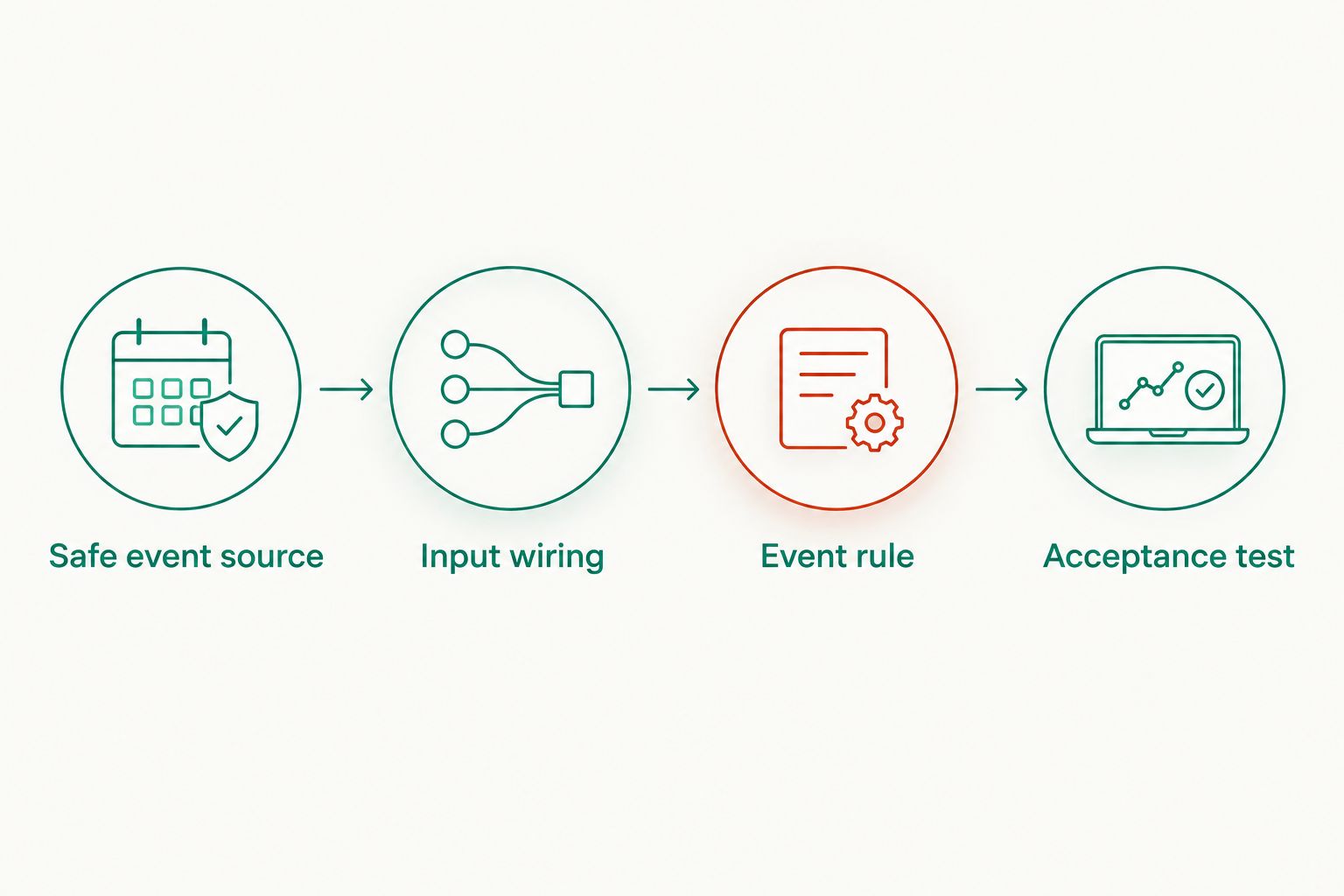
Event rule
- Open the receiving system's alarm-input settings. Locate the input used by the installer. Interface names differ by recorder and panel, so match the physical input identifier on the wiring record rather than assuming that a screen's first listed input is the right one.
- Set the contact interpretation. If the interface offers NO and NC, select the setting that makes the documented normal condition appear normal on screen. Ask the installer to verify any end-of-line supervision settings instead of replacing a supervised zone with an ordinary contact rule.
- Assign the camera and response. Set the event to mark or record the camera that actually covers the safe door and the approach to it. Where the system offers notifications or a monitoring-centre action, configure only the response your service and permissions support. Save the rule using the system's documented control.
- Name the event accurately. Use a location and source description that another operator can understand without this article. Door opened and lock operated are different event names. A generic alarm label makes later footage review harder.
Expected result: changing the contact creates an event associated with the intended camera. Open the resulting footage from the event record; an input icon changing state is not sufficient verification.
Acceptance test
- Run an authorised normal-use test. Tell the relevant staff or monitoring provider that you are testing. Operate the safe as its instructions permit, note the event shown by the input and confirm that the camera footage covers the action. Restore the safe to its intended secured state afterwards.
- Review the saved recording. Find the event in the recorder's timeline, open its associated footage and check that the person and safe door are visible as intended. If an alarm panel is involved, confirm its event log separately. If the business relies on an external monitoring response, obtain confirmation from that provider under its test procedure.
- Test each separately documented signal. Do not assume a successful door-contact test also verifies a lock relay or tamper output. Test only the signals installed, and use the manufacturer's approved procedure for any tamper test. Record which actions generated events and which did not.
Expected result: an operator can locate a specific, viewable recording from the correct event and explain who receives any associated alert. Repeat this test after a recorder replacement, lock service or change to the monitoring rules in 2026.
Variant: get a phone alert when the safe reports an event
If your selected safe-related device supports app notifications, the adjacent workflow is to send an event to a phone rather than wire it into a CCTV alarm input. Confirm the exact device and service first. Then follow its documented pairing and notification steps, trigger an authorised test event and verify the alert reaches the intended person when their phone is off the premises network. The digital-safe phone-alert guide covers that separate setup.
Best for: a business that needs an access notification and has confirmed device compatibility. Limitation: a phone alert does not establish that the NVR saved footage. If you need both an alert and a camera event marker, test both paths independently and retain an escalation plan for alerts that are missed or delayed.
Troubleshooting
- The input stays active when nothing changes. Check the documented normal contact state against the NO or NC setting. If the zone uses end-of-line supervision, have the installer check its required wiring before changing settings.
- The input changes but no footage is attached. Inspect the event rule's camera assignment and recording action. Then generate another authorised event and open the saved footage from the recorder's event list, rather than relying on the on-screen input indicator.
- The footage shows the wrong area. Check which camera the rule references and what the camera can actually see. An event marker cannot supply a useful view if the assigned camera does not cover the safe access point.
- The lock event appears, but door movement does not. The output can be reporting a lock action rather than door position. Check the manufacturer's event definition and use an installer-approved door contact if the workflow requires door status.
- The local alarm logs an event, but the monitoring provider cannot find it. Check that the event was configured for transmission under the site's monitoring agreement. A local log does not prove an external response path works.
Keep the 2026 test record specific: note the event source, receiving input, assigned camera and confirmed response. These details let the next installer diagnose the chain without changing a working safe lock to solve a camera-rule problem.
Customise your workflow
Once the basic event and recording agree, decide who reviews them. A retail manager might need a record of access during cash counts; a site with a monitored alarm needs an agreed after-hours response. Set those as separate rules where the installed system supports them, and document who maintains each rule. Do not treat every authorised daytime opening as the same event as an unexpected after-hours opening.
You can also align safe-access records with the business's cash procedures. An event timestamp helps locate footage, but it does not state the amount deposited or replace a reconciliation record. For the process beyond CCTV, use the time-lock safe to cash reconciliation workflow. Buy A Safe commercial safes should be assessed for their storage and lock requirements first; add monitoring requirements to the specification before settling on the lock configuration.
If your 2026 equipment cannot expose a suitable safe event or accept an external input, keep the camera coverage and access procedure as distinct controls. Skip the claimed integration until a safe technician and CCTV installer have confirmed a supported connection. That is better than an alarm label that implies door monitoring when the system only detects a keypad action.
FAQ
Can any digital business safe trigger a CCTV recording?
No. A digital keypad does not establish that its lock provides an event output. Confirm the specific lock's documentation and the recorder's input requirements before specifying the connection.
What does safe CCTV monitoring integration actually connect?
Safe CCTV monitoring integration connects a documented event output or approved sensor to an alarm input and a camera event rule. The input change must be tested against the saved footage to confirm the connection works.
Is a lock-open event the same as the safe door opening?
No. A lock-status signal reports the action defined in the lock documentation, while a door contact detects door movement. Choose the source that matches the event you need to review.
Does a CCTV event automatically notify an alarm monitoring centre?
No. A CCTV event can remain local to the recorder. A monitoring-centre response requires a configured and tested transmission path covered by the site's monitoring arrangement.
Should I select NO or NC for the safe input?
Select the setting that matches the installed contact's documented normal state and the receiving system's configuration. An installer should verify any supervised-zone requirements before changing the setting.
Can a phone alert replace the CCTV connection?
A phone alert can notify you of a supported device event, but it does not confirm that CCTV footage was recorded. Test the alert and recording as separate functions if you need both.
What should I test after connecting a safe to CCTV in 2026?
Test the documented safe event, the receiving input, the camera assignment and retrieval of the saved footage. Confirm any external monitoring response separately under the provider's test procedure.
One last thing
The event name is part of the security control. If the sensor only reports a lock operation, calling it a door-open or forced-entry event gives the next person reviewing CCTV a false account of what was detected. In 2026, ask the installer to demonstrate the real action behind each event name while you watch the recorder. Buy A Safe can help you compare the commercial safe category, but the connection is complete only when the selected hardware, event rule and recording pass that test.


