

Safe batteries do not have one reliable lifespan: how long they last depends on the lock, the battery specified for it and how the safe is used. In 2026, the dependable replacement trigger is the lock’s low-battery warning or the schedule in its manual, not a universal number of months or years. Replace the battery while the door is open, then test the lock before closing it.
- How long do safe batteries last? There is no universal lifespan; follow the lock’s manual and low-battery warning.
- Replace batteries with the door open, then test the code and locking action before closing it.
- Buy A Safe is best for comparing safes by lock type; check each model’s battery instructions before choosing digital locking.
Why this matters
A weak battery becomes a practical problem when you need access, not when a calendar reminder appears. A slow keypad, an intermittent display or a low-battery signal calls for a check of the instructions for your specific lock. If a fresh battery does not resolve the problem, use the safe lock servicing guide to understand the next step rather than repeatedly trying the keypad.
The distinction matters when you buy a safe, too. Digital locking gives you keypad access but adds a battery-maintenance task; a mechanical key or dial avoids that task but has its own access considerations. Choose the lock you are prepared to maintain, then keep its instructions accessible outside the safe.
How long do safe batteries typically last?
There is no single battery-life figure that applies to every electronic safe lock. For your safe in 2026, the manual’s replacement guidance takes priority over a general estimate because the lock determines which battery to use, how to reach it and what its warning signals mean.
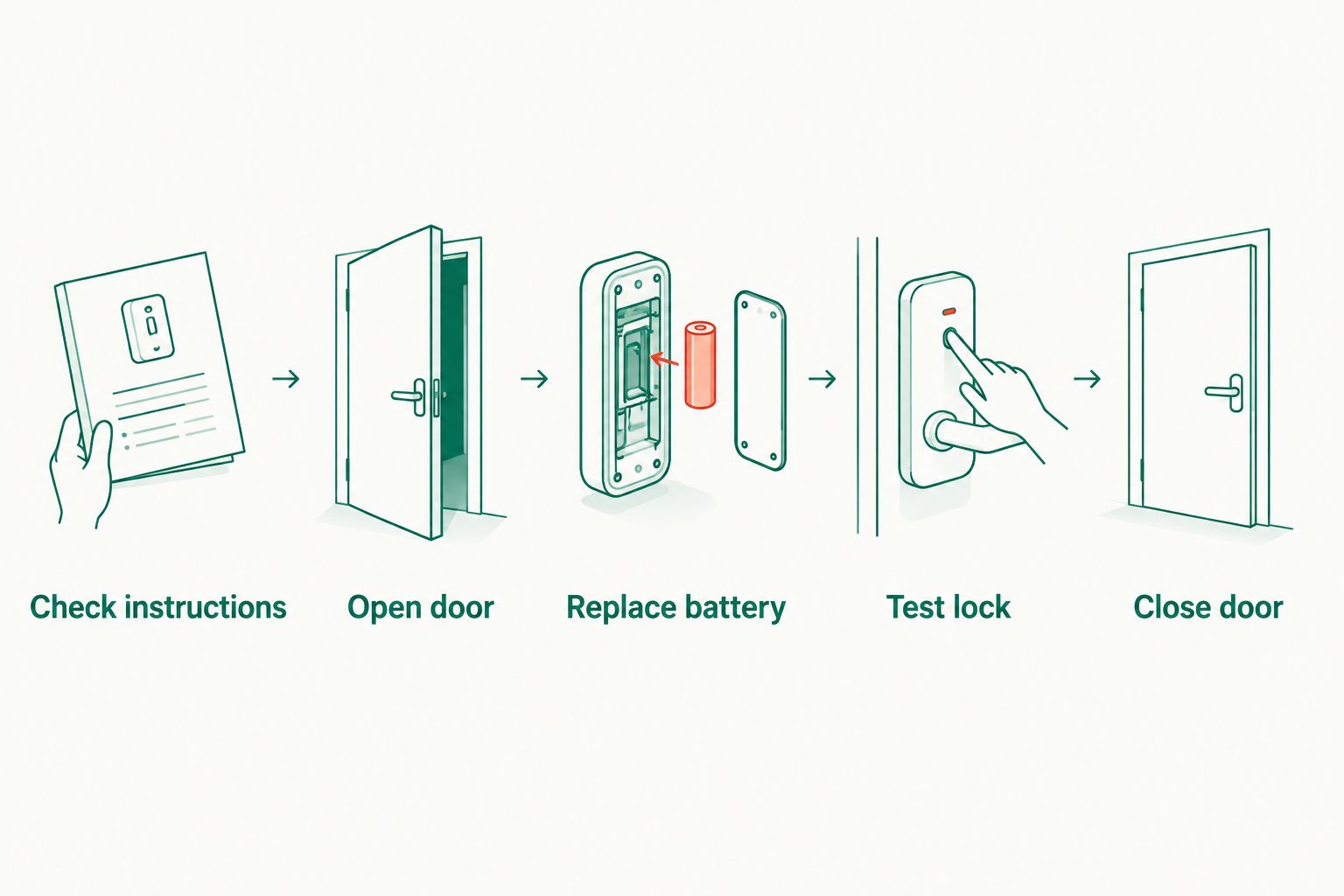
If you do not know when the battery was last changed, use this sequence instead of guessing its remaining life:
- Find the lock instructions. Identify the lock or safe model and check the specified battery and replacement method. A safe’s brand alone does not identify every detail of its lock.
- Open the door while the lock still responds. Battery replacement is easier to verify when you can see and operate the locking bolts without shutting yourself out.
- Replace the battery exactly as directed. Match the specified battery type and polarity. Do not force a battery cover or disturb wiring to reach a compartment you cannot identify.
- Test with the door open. Enter the code and operate the handle or bolts as the instructions describe. Repeat the test if the response is inconsistent.
- Close the door only after the lock works normally. If the warning remains or operation is unreliable, stop and arrange a lock assessment.
This process answers the useful version of the lifespan question: is this battery still supporting dependable access? The lock’s behaviour and its instructions give you a better answer than the date on a generic maintenance calendar.
A simple sequence also prevents a common mistake: replacing a battery and immediately shutting the door. Keep the door open until you have confirmed that the keypad, code and locking action work together.
What if your safe gives no low-battery warning?
Use the replacement guidance for its particular lock and record when you change the battery. An absent warning does not establish that a battery has a set amount of life left. If you cannot identify the lock or locate its instructions, get that information before removing parts of the keypad.
What if the warning appears shortly after replacement?
Recheck the specified battery type, its orientation and whether the compartment is properly closed. If the warning or inconsistent operation continues, the issue needs diagnosis rather than another assumed lifespan. Keep the safe open while access still works and seek qualified help with the lock.
Digital locks and mechanical locks: which needs a battery?
The battery question applies to the lock fitted to the safe, not to every safe in the same category. Compare the access method before you buy or set a maintenance routine.
| Lock option | Best for | Battery consideration | Limitation to plan for |
|---|---|---|---|
| Electronic keypad lock | Users who want to enter a code | Check the lock’s battery specification and replacement instructions | A weak battery or keypad fault needs attention before access becomes unreliable |
| Mechanical key lock | Users who prefer access without keypad batteries | No keypad battery to replace | The key must remain secure and accessible |
| Mechanical combination dial | Users who prefer a battery-free code mechanism | No keypad battery to replace | Correct dial operation matters; use the lock’s instructions |
An electronic keypad is the best fit if you want code entry and will maintain its battery; a mechanical lock is the better fit if avoiding that maintenance is your priority. Neither choice removes the need to understand how its lock works. Do not assume a particular safe includes a backup key, an external power point or a dial unless its product information confirms it.
For a named digital-locking example, Buy A Safe lists the Chubb Mini Banker MkII Security Safe Size 3 Digital Locking (M-40). Its digital-locking designation makes lock maintenance relevant, but it does not establish a battery lifespan or a replacement method. Check the lock documentation for those details before treating any advice here as model-specific.
Buy A Safe is best for buyers comparing safe categories and lock types for home or business use. Its digital-locking safe listings give you a place to identify models; the instructions for the fitted lock remain the authority on batteries.
Why safe battery life varies
In 2026, treat any lifespan claim without a named lock and battery as a rough generalisation. These factors explain why another owner’s replacement date does not become a schedule for your safe:
- The fitted lock. Keypads and locking mechanisms differ. The safe model and the lock model are not always interchangeable descriptions, so identify what is actually installed.
- The specified battery. The correct type comes from the lock instructions. A battery that fits physically is not, by itself, proof that it is the specified choice.
- How often the keypad is used. A frequently accessed business safe and a rarely opened home safe do not have identical use patterns. Follow the relevant manual rather than transferring an interval between them.
- The lock’s warning behaviour. Some electronic locks provide a low-battery indication. Learn what your own lock does so you can act on its warning while the door still opens.
- Battery installation and condition. Incorrect polarity, poor contact or a weak replacement battery can leave a lock behaving as though its battery is exhausted. If replacement does not restore normal operation, investigate the lock instead of assuming the new battery is fine.
These are reasons to use model-specific instructions, not a formula for calculating an expiry date. Write down the safe and lock details outside the safe. When you need a replacement battery or service, that information is more useful than a guess about when the old battery was installed.
Is regular replacement better than waiting for a warning?
Follow the interval stated by the lock manufacturer if it gives one. If it does not, monitor the lock’s behaviour, keep a record of changes and act promptly on a warning. A routine check is useful; presenting one replacement interval as correct for all safe locks is not.
Does a safe’s fire rating tell you anything about battery life?
No. Fire protection and electronic-lock power are separate specifications. A safe can meet your storage needs while still requiring you to maintain its keypad battery according to the lock instructions.
What should you do if the battery dies while the safe is locked?
First identify the safe and lock model and consult its instructions. Follow only the access or battery-replacement method documented for that lock; do not assume advice for another keypad applies to yours. If you cannot establish the correct procedure, use a qualified safe technician rather than prying at the door or dismantling the keypad.
Check for simple causes before treating the safe as permanently locked: whether the keypad responds at all, whether it shows a warning and whether you are entering the correct code. Avoid repeated guesses if the lock stops responding. Repeated attempts do not replace a functioning power supply and can complicate diagnosis.
Once access is restored, leave the door open while you verify the replacement battery and code. If a fresh battery has not restored normal operation, a battery change alone has not solved the fault. Buy A Safe offers safe repair and opening services; describe the lock’s behaviour and provide its model details when requesting help.
How can you avoid a safe-battery lockout?
Keep maintenance straightforward. In 2026, the useful habit is to know the lock’s instructions, recognise its warning and test any battery change before closing the door.
- Store the instructions outside the safe. A document locked inside the safe cannot help when its keypad stops responding.
- Record the battery change. Note the date and battery type you used so the next person does not have to guess.
- Confirm the replacement before removing the old battery. Check the exact lock instructions rather than relying on the appearance of the battery compartment.
- Treat unusual behaviour as a prompt to act. A warning, weak response or intermittent operation deserves attention while access remains available.
- Test the complete opening and locking action. A lit keypad alone does not confirm that the safe will open after you close its door.
If several people use the safe, make sure the person responsible for maintenance knows where the instructions are kept. That responsibility matters more than an arbitrary reminder that does not match the lock’s guidance.
FAQ
How long do safe batteries last?
There is no universal lifespan for safe batteries. Use the replacement guidance and low-battery signals for your specific electronic lock, and test a replacement with the door open.
Should I change my safe battery before it goes flat?
Yes, change it when the lock’s instructions call for replacement or it gives a low-battery warning. Do not wait for the keypad to stop responding.
Can I replace a safe battery while the door is closed?
Follow the procedure for your specific lock, but replace it with the door open whenever access allows. That lets you test the code and locking action before closing the safe.
Will my safe lose its code when I replace the battery?
Check the instructions for your particular lock rather than assuming how it stores codes. After replacement, test the existing code with the safe door open.
Do all safes need batteries?
No. Electronic keypad locks require a power source, while mechanical key and combination-dial locks do not need keypad batteries.
Does a low-battery warning mean my safe is broken?
No. It is a prompt to follow the lock’s battery-replacement instructions. If the warning remains after a correct replacement, have the lock assessed.
What if a fresh battery does not open my safe?
Check the battery specification and installation against the lock instructions. If the safe remains locked or behaves inconsistently, contact a qualified safe technician rather than forcing the mechanism.
One last thing
The safest time to learn your lock’s battery procedure is while the safe is open and working. In 2026, find its instructions, identify the specified battery and keep those details somewhere you can reach without opening the safe. Buy A Safe’s safe buyers should make that check when selecting digital locking, not after the first low-battery warning.


