

Instead of manually reconciling safe-access records with a government audit log, use a documented, agency-authorised event export and import workflow where the installed lock supports it. An SCEC-approved safe is not, by that description alone, a network-connected device: confirm the exact container, lock and permitted interface before connecting anything.
- An SCEC safe government audit log workflow needs verified event-export capability and agency authorisation, not just an approved container.
- Keep lock events, door events and document movements separate: each records different evidence.
- Use an authorised manual register when the installed lock cannot export events.
- BUYASAFE supplies safes; confirm audit-log compatibility against the exact installed lock and receiving system.
Why this matters
A safe protects its contents. An audit trail records activity. Neither function proves the other: an unlock record does not establish which document someone removed, and a nearby access-control reader does not prove the safe opened.
For your 2026 implementation, start with the evidence your agency needs, then select an authorised way to collect it. Read BUYASAFE's guide to choosing an SCEC-approved safe for government offices before treating an existing container as suitable for a new use.
BUYASAFE is best for government buyers selecting physical safes, not as evidence that a particular lock connects to an audit platform. Keep the purchasing decision separate from the integration decision.
Before you start
- Equipment records and authority: Obtain the exact container model, installed lock model, applicable approval documentation and operating instructions. Have your agency security adviser confirm the proposed configuration and any installation changes before work starts.
- Source and destination access: Obtain authorised access to the lock's documented audit function, if fitted, and a test destination in the agency's nominated records or security-monitoring system. Identify who approves field mapping, access permissions, retention and incident handling.
- The gotcha: A digital keypad does not establish that a lock stores events, exports records or accepts a network connection. Stop if the manufacturer documentation does not establish the required capability; do not add a consumer bridge, replacement lock or sensor as an improvised workaround.
Treat this as a configuration and acceptance guide, not a universal button-by-button connector recipe. Follow the actual lock and destination manuals for interface labels; there is no single SCEC safe audit-log interface to configure.
Configuration unit: approved evidence path
- Identify the installed configuration. Record the container identifier, lock model and relevant software or firmware details where available. Check the installed equipment rather than relying on a procurement description or a photograph of a similar safe.
- Define the required evidence. Specify whether the audit log needs credential use, successful unlocking, failed access attempts, door position, administrative changes or document movements. Include only events the documented source actually produces.
- Confirm the permitted connection method. Ask the responsible security and system owners to approve the documented export or integration method. Record any restrictions on removable media, network access, maintenance equipment and storage locations.
- Select the evidence path below. Use automated transfer only where the equipment supports it and the agency authorises it. Otherwise use controlled export or an authorised manual register.
Expected result: You have an agreed source, destination and transfer method, with a named owner for each. Your 2026 configuration record explains what the workflow proves and what it does not.
| Evidence path | Best for | Benefit | Limitation |
|---|---|---|---|
| Documented automated transfer | Supported equipment with an agency-authorised interface | Removes repeated file handling | Depends on supported connectivity, monitoring and security approval |
| Controlled export and import | Export-capable locks without an authorised live connection | Preserves source records without a live interface | Records reach the destination after export; handling needs oversight |
| Authorised manual register | Equipment without usable event export | Records declared access without modifying the safe | Relies on people completing and reviewing entries |
Do not replace a physical-security decision with a connectivity preference. An unsupported connection is not an acceptable shortcut simply because it produces a dashboard.
Configuration unit: event record
- Collect a permitted sample. Use a test environment or an authorised maintenance procedure to obtain a sample export. Preserve the original file unchanged in the approved location before transforming it.
- Create a field map. Match the source's documented fields to destination fields. Distinguish the event time from the import time, and retain the original event description alongside any standardised description.
- Resolve identity and time. Establish how a credential identifier maps to an authorised person during the relevant period. Record the source time zone and any known clock discrepancy rather than silently changing the original evidence.
- Define record identity. Use a documented source event identifier where one exists. Otherwise agree a duplicate-detection method with the destination owner; do not assume timestamp alone uniquely identifies an event.
Expected result: A reviewer can trace each destination entry back to its source record without guessing who, when or what the entry represents.
Use the following as a proposed mapping checklist, not as manufacturer field names or guaranteed output. Omit unsupported fields rather than filling them with assumptions.
| Proposed destination field | Source or handling rule |
|---|---|
| Container identifier | Agency asset register, checked against the installed safe |
| Source identifier | Documented lock or event-source identifier |
| Event time | Original timestamp with its time-zone context |
| Receipt time | Time the receiving system accepted the record |
| Event type | Source description plus an agreed mapped description |
| Credential reference | Source credential identifier, where recorded |
| Event reference | Documented event identifier, where provided |
| Evidence reference | Location of the preserved source export |
For the 2026 identity register, preserve historical credential assignments according to agency requirements. Reassigning a credential must not make an earlier event appear to belong to its new holder.
A shared code prevents reliable individual attribution from that code alone. If the operating procedure permits shared credentials, record that limitation and establish the additional evidence the security owner requires.
Configuration unit: controlled transfer
- Prepare the destination. Have the system owner configure the authorised import or ingestion method, restricted access and approved storage location. Keep the workflow limited to collecting evidence; do not introduce remote unlocking as part of a logging project.
- Configure the supported source method. Follow the manufacturer's instructions for the installed equipment. Use only the documented export format or authorised interface, with permissions limited to the task.
- Validate before accepting records. Check required fields, timestamp interpretation, recognised event types and duplicate handling. Route rejected records to an approved review process instead of silently discarding them.
- Preserve the evidence chain. Retain the original export and record who transferred it, when it was received and which import processed it. Apply the agency's approved protection, retention and disposal requirements.
Expected result: Valid records arrive through the authorised route, rejected records remain visible, and the original evidence stays retrievable.
The evidence sequence is source, preserved record, validated mapping and destination entry. Keep those stages distinguishable so an import error does not overwrite the only copy of the source evidence.
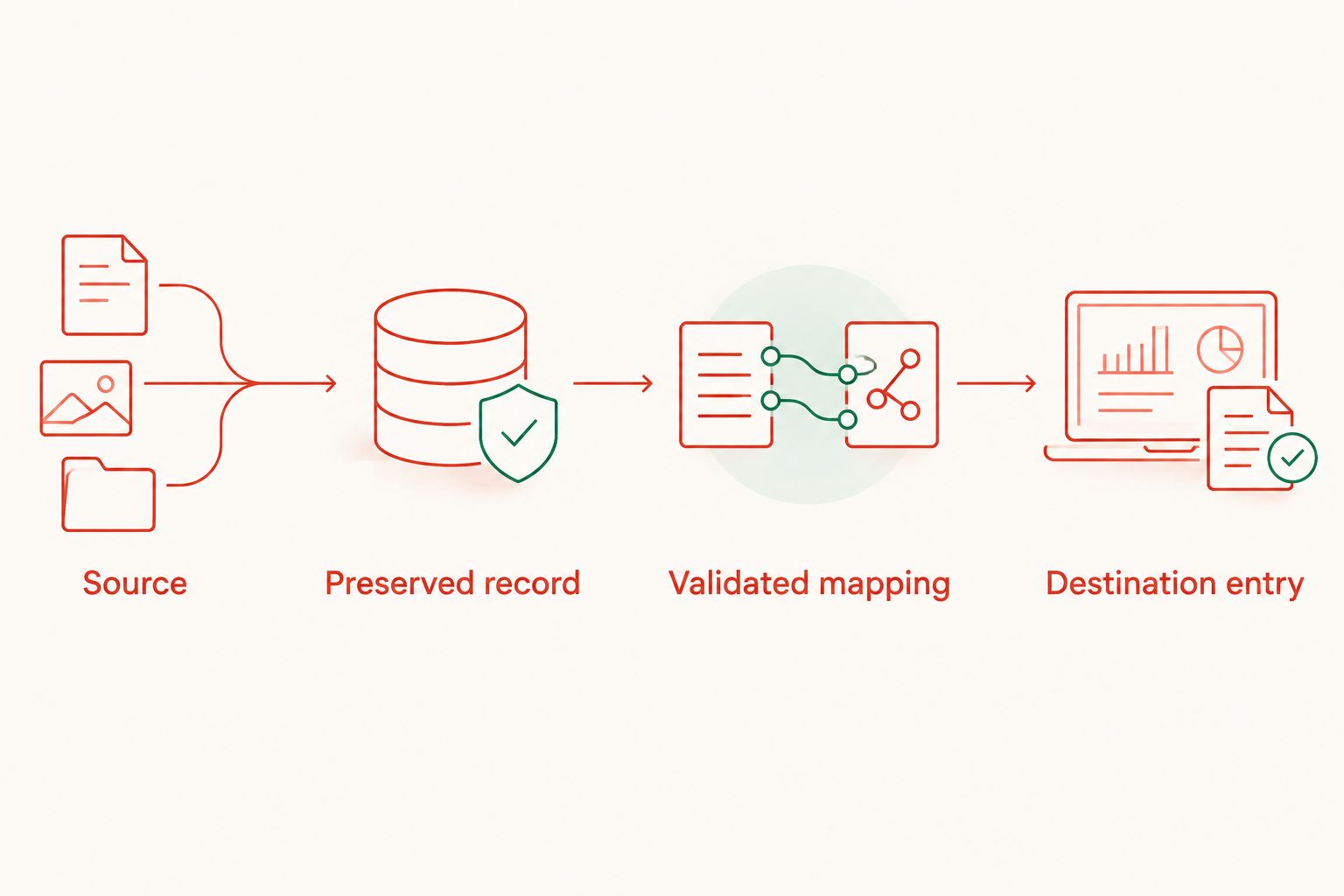
Set the transfer frequency from the agency's evidence and response requirements, then confirm the equipment can support it. A periodic file import is not live monitoring; label it accurately in the operating procedure.
Configuration unit: acceptance evidence
- Limit the initial scope. Start with 1 safe in an authorised test scope. Record the expected source events before running the test, and avoid deliberately triggering lockouts or alarms without permission.
- Test distinct activity. Where supported and authorised, include 3 event types: a successful unlock, a failed credential attempt and an administrative change. Substitute documented events if the installed lock does not record these types.
- Test replay protection. Process the same authorised sample through 2 import runs. Confirm the destination handles the replay as designed without presenting duplicate activity as fresh access.
- Test failure and recovery. Simulate a transfer interruption in the test environment, restore the authorised route and reconcile the result. Confirm the workflow reports gaps and handles delayed records without losing their original event times.
- Approve the operating procedure. Have the responsible owners accept the mapping, limitations, recovery steps and evidence package. Record the configuration version and approval date before operational use.
Expected result: Your 2026 acceptance record demonstrates the actual workflow, including duplicate handling and recovery. It does not merely show that a connection succeeded.
These are proposed test quantities, not government-mandated thresholds. Expand the test scope to match the agency's acceptance requirements and the equipment's documented functions.
Second workflow: record access without an electronic export
An authorised manual register is the alternative when the installed safe has no usable audit output. It records a person's declaration of activity, not an independently generated lock event.
- Establish the register in the agency-approved records environment. Define who can create entries, review them and correct errors while preserving the correction history.
- Require the authorised user to record the container identifier, access time, identity and purpose under the agreed procedure. Add a document or transaction reference only where permitted.
- Record closing checks or witness confirmation where the agency procedure requires them. Keep declared checks separate from electronically detected door or bolt status.
- Assign a reviewer to investigate incomplete, inconsistent or late entries. Record the investigation outcome without deleting the original entry.
Expected result: The agency has a controlled access register with clear evidentiary limits. Do not describe this arrangement as an automated connection or use it where the agency requires electronic evidence.
For a BUYASAFE safe purchase supporting this workflow, specify the physical-security requirement first. A manual register does not make an unsuitable container suitable, and a new keypad does not establish audit capability.
Troubleshooting
The lock has a keypad but no export function
Check the exact lock manual and installed configuration. If no documented audit export exists, use the authorised manual process or refer the capability gap to the security owner; do not assume a cable or adapter solves it.
Events arrive with the wrong time
Compare the source clock, time-zone interpretation and receiving-system display. Preserve the original timestamp, document the discrepancy and correct future configuration through the authorised procedure rather than rewriting historical evidence without traceability.
Re-importing a file creates duplicate entries
Review the event identity and replay rules. Quarantine the repeated batch, reconcile it against the preserved source, and test the corrected handling before resuming routine imports.
An unlock appears but no door opening appears
Check whether the installed system actually measures door position. Treat unlocking and opening as separate events; a missing sensor-derived event cannot be manufactured from a credential record.
Records stop arriving
Check the source export, transfer permissions, destination rejection records and any documented source-storage limits. Escalate the evidence gap, preserve available records and reconcile the missing period before declaring service restored.
Customise your workflow
Expand the workflow only after the initial evidence path passes acceptance. Add another container with its own source identifier and verified capabilities, rather than copying assumptions from the first installation.
Use separate references for physical access and document transactions. An audit log can link to a document-management record where authorised, but it should not expose document contents or access credentials simply to make searches easier.
If the project also covers paper records, BUYASAFE's guide to connecting a filing cabinet lock to document software addresses that adjacent workflow. Revalidate its applicability against your agency's environment.
FAQ
Can every SCEC-approved safe connect to a government audit log?
No: SCEC approval alone does not establish event-export or network capability. Verify the exact installed lock, supported interface and agency authorisation before designing the connection.
Does a digital safe lock automatically record who opened the safe?
A digital keypad alone does not establish individual audit capability. Check whether the installed lock records credential events, and whether credential assignments identify individuals during the relevant period.
What is the best SCEC safe government audit log workflow?
The best workflow uses the installed equipment's documented evidence output through an agency-authorised transfer method. Use an authorised manual register only where the agency accepts its limitations.
Can I use a consumer smart-home bridge to collect safe events?
Do not add a consumer bridge without explicit equipment support and agency authorisation. Refer any proposed modification or connection to the responsible security and system owners before installation.
Does an unlock record prove that a document was removed?
No: an unlock record does not prove a document movement. Use a separate authorised document transaction record and correlate it with access evidence where permitted.
How long should government safe audit records be retained in 2026?
Use the retention and disposal requirements applicable to your agency and record type. Have the records owner approve the period and handling rules rather than choosing a generic duration.
Does BUYASAFE confirm audit-platform compatibility just by listing a safe?
A safe listing alone does not establish audit-platform compatibility. Obtain documentation for the exact installed lock and receiving system, then have the responsible agency owners approve the proposed workflow.
One last thing
A quiet audit log is not proof that a safe remained closed. It can also mean the source stopped recording or the transfer failed. Include a documented way to verify collection is functioning, and distinguish confirmed inactivity from an unexplained evidence gap.


