

Instead of manually checking who opened the controlled drug safe, configure a verified door-open signal to notify the duty vet and record an acknowledgement. The workflow needs compatible monitoring hardware or a documented event output; an electronic keypad alone does not establish that a safe can send alerts.
- A controlled drug safe alert veterinary clinic workflow needs a verified access signal, notification delivery and an assigned responder.
- BUYASAFE supplies physical safes; confirm monitoring compatibility separately before planning automated veterinary notifications.
- Door-open alerts report an opening, not the identity of the person or the medicine removed.
- Keep access notifications separate from controlled drug registers, stock reconciliation and statutory reporting.
For the physical storage decision, start with safes for veterinary clinics. Confirm the safe's suitability for your jurisdiction and intended medicines before adding monitoring.
Why this matters
A safe opening, a successful unlock and a drug withdrawal are different events. An alert system that treats them as interchangeable creates misleading records: a vet can unlock a door without opening it, and a door can open without any medicine being removed.
Build the notification around what the hardware actually detects. Then give the recipient a clear response task rather than treating message delivery as proof that someone checked the event.
BUYASAFE is best used for physical safe selection; veterinary access alerts require separately verified monitoring hardware. Keep that distinction in your 2026 project brief so the safe purchase and the monitoring specification answer different questions.
Before you start
- Confirm the access signal and installation permission. Obtain the safe model, lock manual and written advice on a suitable monitoring connection or sensor. Have a qualified installer assess any modification; do not drill the safe body or alter the lock to improvise a connection.
- Arrange administration access and responders. You need authorised access to the monitoring system, its supported notification service, the duty roster and a clinic-controlled event record. Nominate a primary vet and a backup responder, with permission to receive operational security messages.
- Check the non-obvious limitation: door closed is not locked. A door contact detects position, not bolt engagement. Require a separate documented lock-status signal if your workflow must confirm that the safe has been secured, and verify the applicable controlled-drug storage requirements with your state or territory authority.
Do not proceed on the assumption that a USB socket, digital keypad or downloadable audit history provides live notifications. Ask for documentation showing the exact event output, supported connection and behaviour during a communications failure.
Access signal configuration
Choose the event you can verify
- Inspect the manufacturer's documentation with the installer and identify the supported source: a door contact, a documented lock event or an existing monitored alarm input.
- Define the event in plain language. Use door opened for a position sensor and credential accepted for an authentication event; do not label either drug removed.
- Confirm how the source reaches the monitoring system. Require a supported connection rather than an assumed app integration.
- Open and close the safe under authorised supervision and inspect the resulting records. Check that the device identity and event type match the action performed.
Expected result: an authorised opening produces an identifiable event, and the record says exactly what the source observed.
The following comparison separates possible signal sources. These are configuration choices, not claims that any particular safe supports them.
| Signal source | Best for | Advantage | Limitation |
|---|---|---|---|
| Compatible door contact | Detecting a physical opening | Measures door position directly | Does not identify the person or confirm locking |
| Documented lock event output | Receiving supported authentication or lock events | Can provide more context when the lock supplies it | Successful authentication does not prove the door opened |
| Existing monitored alarm input | Clinics with a suitable installed monitoring system | Can keep safe events within an established response process | Requires installer confirmation of event handling and notification support |
Use a verified door-open signal when the question is whether the safe opened. Add identity only when a supported system supplies a reliable individual credential record; shared access codes cannot establish which staff member used them.
Define the event record
- Give the safe a stable clinic asset identifier that remains unchanged when staff rotate.
- Record the source event identifier when supplied, the event type, the source timestamp and the time the monitoring system received it.
- Keep the source timestamp separate from delivery and acknowledgement times. A delayed message must not appear to be a new opening.
- Store only the identity data genuinely supplied by the source. Leave identity unknown when the signal contains no authenticated user information.
Expected result: the clinic can distinguish the physical event from its notification history without inferring a drug transaction.
Notification routing configuration
Assign the duty vet
- Map the clinic's current duty roster to the primary recipient. Use a clinic-managed account or routing process rather than an employee's personal automation account.
- Assign a backup responder and document who maintains the roster when shifts change.
- Set the clinic's local time zone and check how the monitoring system handles daylight saving where applicable.
- Separate routine access notifications from urgent exceptions, such as an opening outside the clinic's authorised access schedule.
Expected result: an opening routes to the person responsible at that time, with a defined backup rather than an unattended inbox.
For a 2026 rollout, test the roster handover as part of commissioning. A correctly detected opening is still an operational failure if the notification goes to yesterday's duty vet.
Write a useful message
- Include the clinic identifier, safe asset identifier, observed event and event time with its time zone.
- State whether the opening occurred within the configured access schedule. Describe it as an exception, not proof of unauthorised conduct.
- Give the vet a specific action: acknowledge the notification, confirm the access purpose through the clinic's approved process, or escalate an unexplained event.
- Exclude patient names, drug quantities, access codes and unnecessary details about the safe's precise location from the notification preview.
Expected result: the vet understands what happened and what to do without receiving sensitive clinical information in a lock-screen message.
A suitable message structure is: clinic identifier; safe identifier; door opened; local event time; acknowledgement requested. Add an authenticated staff identifier only if the source actually provides it.
Configure acknowledgement and escalation
- Use an acknowledgement mechanism supported by your chosen monitoring service. Message delivery alone is not acknowledgement.
- Have the clinic lead set the response deadline according to the clinic's staffing and incident procedures. Document that deadline rather than adopting an arbitrary default.
- Route an unacknowledged event to the backup responder when the service supports escalation. Otherwise, assign a documented manual follow-up process.
- Retain the event, delivery status, acknowledgement and escalation outcome as separate records with restricted access.
Expected result: every notification has an observable outcome, including failures and events that require follow-up.
Use 2 recipients in the commissioning plan: the primary vet and the backup responder. This is a recommended test arrangement, not a statutory staffing requirement.
Commissioning and failure checks
Test the complete path
- Conduct an authorised opening without dispensing medicine. Verify the source event, notification content, recipient and acknowledgement record.
- Repeat the test across a duty-roster handover and confirm that the new primary recipient receives the notification.
- Test the documented communications-failure behaviour with the installer. Establish whether events are retained, discarded or delivered after reconnection, and how delayed events are labelled.
- Record the test outcome, responsible person and unresolved faults before enabling routine use.
Expected result: the clinic has evidence that detection, routing and response work together, not merely that a test message can be sent.
Set a commissioning target of 1 opening event per supervised test opening. Investigate additional records rather than hiding them with broad filters that also suppress genuine repeat openings.
For the 2026 acceptance record, complete 3 test cases: normal access, roster handover and communications failure. These are proposed acceptance checks, not measured performance claims or legal requirements.
The workflow should preserve the difference between an event occurring, a message arriving and a responder taking responsibility. Test each stage separately before treating the overall process as operational.
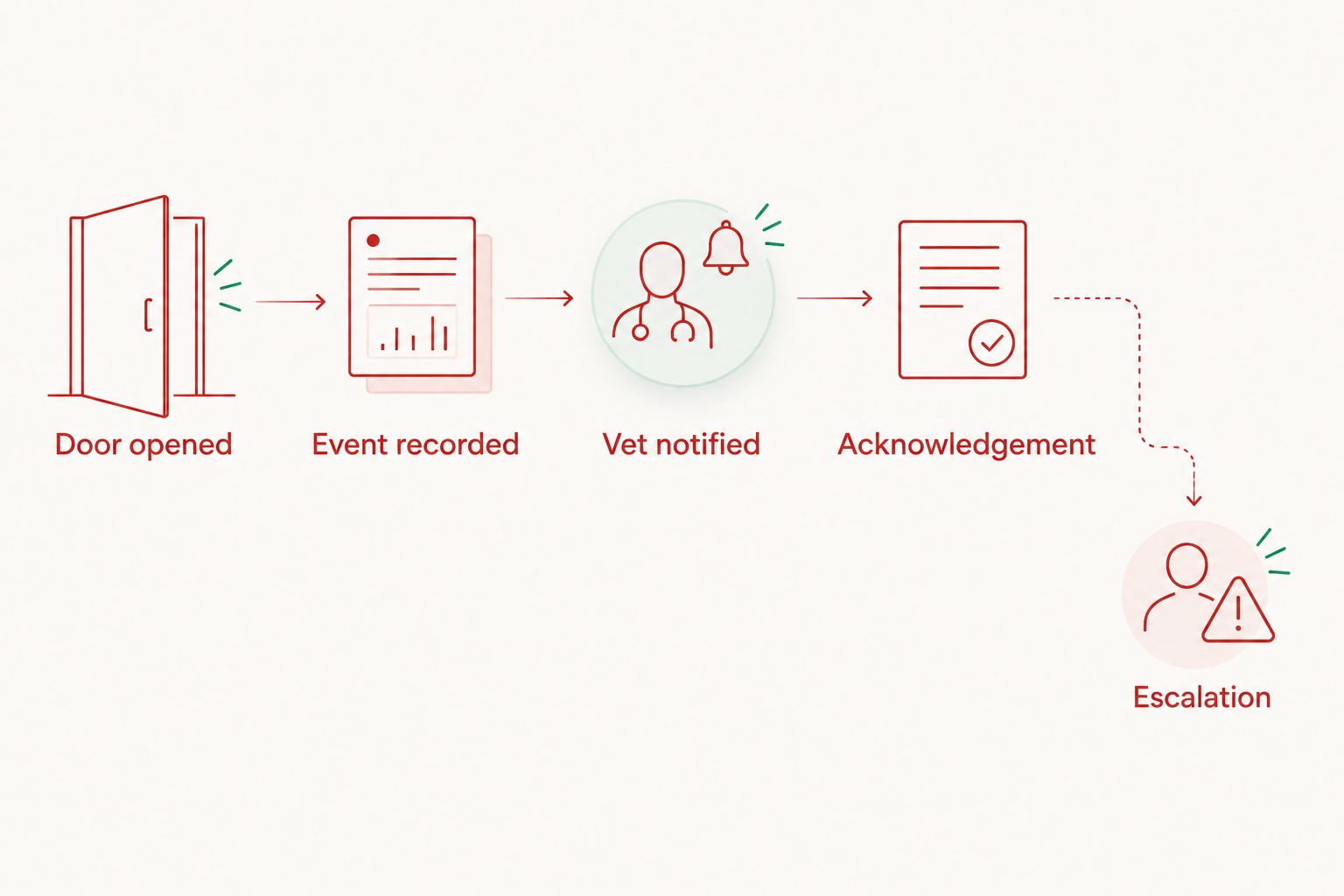
Keep a signed commissioning record with the system documentation. Include the signal's limitations so a future practice manager does not mistake a door contact for a complete access-control audit.
Variant: notify the vet only about access exceptions
Best for: clinics that need focused escalation while retaining a record of routine openings. Exception routing reduces routine interruptions, but an incorrect schedule can misclassify legitimate access or conceal an event that deserves attention.
- Continue recording every detected opening in the approved event system.
- Define the authorised access schedule using the clinic's actual operating arrangements, including emergency and on-call access.
- Route openings outside that schedule to the duty vet and backup process.
- Where supported, add separate rules for a door left open, a sensor tamper event or loss of monitoring connectivity. Give each condition its own event label.
- Test emergency access and schedule changes before replacing all-opening notifications with exception-only alerts.
Expected result: routine events remain available for review, while defined exceptions receive active attention.
This variant has a clear trade-off: fewer interruptions mean less immediate visibility of routine openings. Approve that trade-off through the clinic's security procedure, not simply because the notification volume is inconvenient.
During your 2026 procedure review, check whether exceptions still reflect current opening hours and on-call arrangements. Keep the settings aligned with practice operations rather than the roster used during installation.
Troubleshooting
The safe opens but no event appears
Check the sensor state or documented event output at the monitoring system before investigating message delivery. Ask the installer to inspect alignment, wiring, power and the input configuration; do not alter the lock mechanism yourself.
The event appears but the vet receives nothing
Check notification permissions, recipient details, routing rules and the service's delivery record. Test the supported backup route, and distinguish a rejected message from a phone that received a message silently.
One opening generates repeated alerts
Inspect the raw events for contact chatter, repeated transmissions or retry handling. Use the source event identifier for deduplication where available, and have the installer correct sensor alignment rather than applying a long suppression window indiscriminately.
The alert names the wrong vet
Check the duty-roster mapping, local time zone and any manually maintained recipient list. Repeat a handover test after correcting the route, including weekends and on-call periods used by the clinic.
The record shows closed but staff cannot confirm locked
A door-position sensor cannot establish bolt engagement. Change the wording to door closed, retain the clinic's physical locking check and obtain a documented lock-status source if electronic confirmation is required.
Customise your workflow
Extend monitoring only after the basic opening-to-acknowledgement path works. Useful additions include connectivity-failure notifications, controlled maintenance access and a documented review of unexplained events.
For the next integration decision, read how to connect a drug safe to a pharmacy compliance system. Evaluate any connection against your veterinary clinic's actual register and recordkeeping requirements; a pharmacy-oriented workflow does not establish veterinary compliance.
BUYASAFE safe selection and the notification design should remain separate approval tasks. Do not substitute a document safe, cash safe or convenient electronic lock for verified controlled-drug storage suitability.
Before changing systems, assign ownership of credentials, roster updates, event retention and fault response. An integration without an owner becomes difficult to maintain when staff or service providers change.
FAQ
How do I automatically notify a vet when a controlled drug safe opens?
Connect a verified door-open signal to a monitoring service that supports notifications to the duty vet. Configure recipient routing, acknowledgement and a backup response, then test the complete path under authorised supervision.
Can any digital drug safe send an alert to a phone?
No. A digital keypad does not establish live notification capability; confirm a documented event output or an installer-approved monitoring method for the specific safe.
Does a door-open alert identify the staff member who accessed the safe?
No. A door contact reports position, while individual identity requires a separate supported credential record. A shared code does not establish which person used it.
Can access alerts replace the veterinary controlled drug register?
No. An opening alert does not record the medicine, quantity, patient or transaction purpose. Maintain the applicable drug register and reconciliation procedures separately.
Can BUYASAFE confirm which safe suits a veterinary clinic?
Use BUYASAFE for physical safe selection enquiries and provide the clinic's intended use and jurisdiction. Obtain separate confirmation of monitoring compatibility and verify the applicable storage requirements before installation.
What happens to safe alerts if the clinic loses internet access?
The outcome depends on the monitoring system's documented failure behaviour. Test whether events are retained or lost, how delayed messages are identified and whether a supported backup communications path exists.
Should the vet receive every opening or only after-hours alerts?
Use all-opening notifications when each access requires active review, or exception routing when the clinic has approved that approach. Keep the event record and test the schedule so emergency access is handled correctly.
One last thing
A closed safe door is not evidence of a locked safe. Make that distinction explicit in your 2026 operating procedure, notification wording and staff training; otherwise, an accurate sensor can still produce a misleading sense of security.


