

Instead of manually copying vehicle key sign-outs into a fleet register, connect your key cabinet to your fleet management system through a supported connector or documented API so verified key movements update the correct vehicle record. A keypad alone does not establish compatibility: confirm that the cabinet can identify individual keys and export their movements before attempting automation.
- To connect key cabinet to fleet management system, confirm individual-key tracking and a supported data connection first.
- BUYASAFE is best for buyers sourcing physical key storage; confirm fleet integration separately before selecting a cabinet.
- Match permanent vehicle, key and driver identifiers before automating key sign-outs or returns.
- Keep key custody separate from vehicle readiness, booking status and maintenance clearance.
Why this matters
A locked cabinet controls physical access. Fleet software records vehicle activity. Connecting them only creates a useful audit trail when the cabinet reports which key moved, who took it and when it returned.
Opening a cabinet is not evidence that a particular vehicle key was removed. If staff can access several keys after entering a shared code, that access event cannot reliably identify the vehicle they selected.
For a 2026 deployment, separate your physical storage requirements from your software requirements. BUYASAFE sells safes and key cabinets, but electronic locking must not be treated as evidence of an API, network connection or individual-key tracking.
Before you start
- Hardware evidence: Obtain the exact cabinet model, controller details and manufacturer documentation. Confirm individual-key identification, user identification, event export and the supported connection method. Stop the automated route if the cabinet cannot report individual-key movements.
- Software access: Arrange authorised administration access to the fleet platform and cabinet software, plus the relevant integration documentation. Confirm that your software access permits the required read and write operations; use test records or a separate test environment where supported.
- A controlled pilot: Prepare 1 test vehicle, 1 assigned key and 2 named test users. The non-obvious gotcha is identity: a cabinet slot, registration plate and vehicle record ID are different identifiers. Map them explicitly before sending events.
Do not start by drilling, rewiring or modifying the cabinet lock. Use only manufacturer-supported interfaces, and leave physical installation and electrical work to appropriately qualified people.
Choose the connection method
Select a method from the capabilities documented for both systems. Do not choose an automation platform first and assume the cabinet will connect to it.
| Connection method | Best for | Advantage | Limitation |
|---|---|---|---|
| Supported connector | A cabinet and fleet platform with a documented integration | Uses an established connection path | Supported events and controls are limited to the connector's documented scope |
| Documented API | Systems exposing the required events and fleet operations | Allows explicit mapping and validation | Requires implementation, credential management and ongoing maintenance |
| File transfer | Systems supporting compatible event exports and imports | Supports scheduled reconciliation | Does not provide immediate updates between transfers |
| Manual register | Cabinets without machine-readable key events | Keeps a usable custody record without hardware integration | Depends on staff entering accurate movements |
Use a supported connector when its documented behaviour matches your workflow. Choose an API connection when you need supported operations that the connector does not provide. Keep file transfer or manual recording clearly labelled as delayed or staff-entered records.
For your 2026 specification, write down whether you need reporting only or actual access control. Reading a key-removal event and remotely authorising key release are separate capabilities; do not assume either implies the other.
Cabinet event source
- Identify the documented source of key-removal and key-return events. Use the supported connector, webhook, API or export mechanism described by the cabinet manufacturer.
- Assign the test key to its vehicle and record the cabinet's permanent key identifier. Keep the slot location as a separate attribute so moving a key does not change its identity.
- Assign individual user credentials where supported. Map each cabinet user to an authorised fleet user; do not use a shared account to attribute personal custody.
- Remove and return the test key. Inspect the source records for the key identifier, user identifier, event type and event time. Retain a unique event identifier where the source provides one.
- Record what the source cannot distinguish. A door-open event belongs in an access log, not automatically in a vehicle's key-custody history.
Expected result: You can trace the test key's removal and return to the correct person without guessing from a cabinet opening or a nearby booking.
Check spare keys too. If several physical keys operate the same vehicle, give each tracked key its own identity while mapping them to the same vehicle. Otherwise, returning a spare can incorrectly appear to close the original checkout.
Fleet record mapping
- Select the fleet platform's documented destination for custody information. Prefer a supported key transaction or suitable activity record over changing a general vehicle status.
- Build a mapping register containing the cabinet key ID, fleet vehicle ID and authorised user ID. Add the site and cabinet identifier where several locations use overlapping slot labels.
- Translate source event types into explicit custody actions. A key-removal event should record a checkout; a key-return event should close the corresponding custody transaction.
- Keep the event time separate from the time your integration receives it. Preserve the timezone or offset so delayed messages do not appear to describe current activity.
- Send unmatched identifiers to an exception queue for investigation. Do not guess the vehicle from a similar registration plate or a driver's most recent booking.
Expected result: The fleet record shows the correct key, vehicle, user and event time, and unmatched records remain visible rather than silently disappearing.
Use permanent internal IDs as your join keys. Registration plates, display names and slot descriptions are useful for people, but changing them should not redirect historical custody events to another asset.
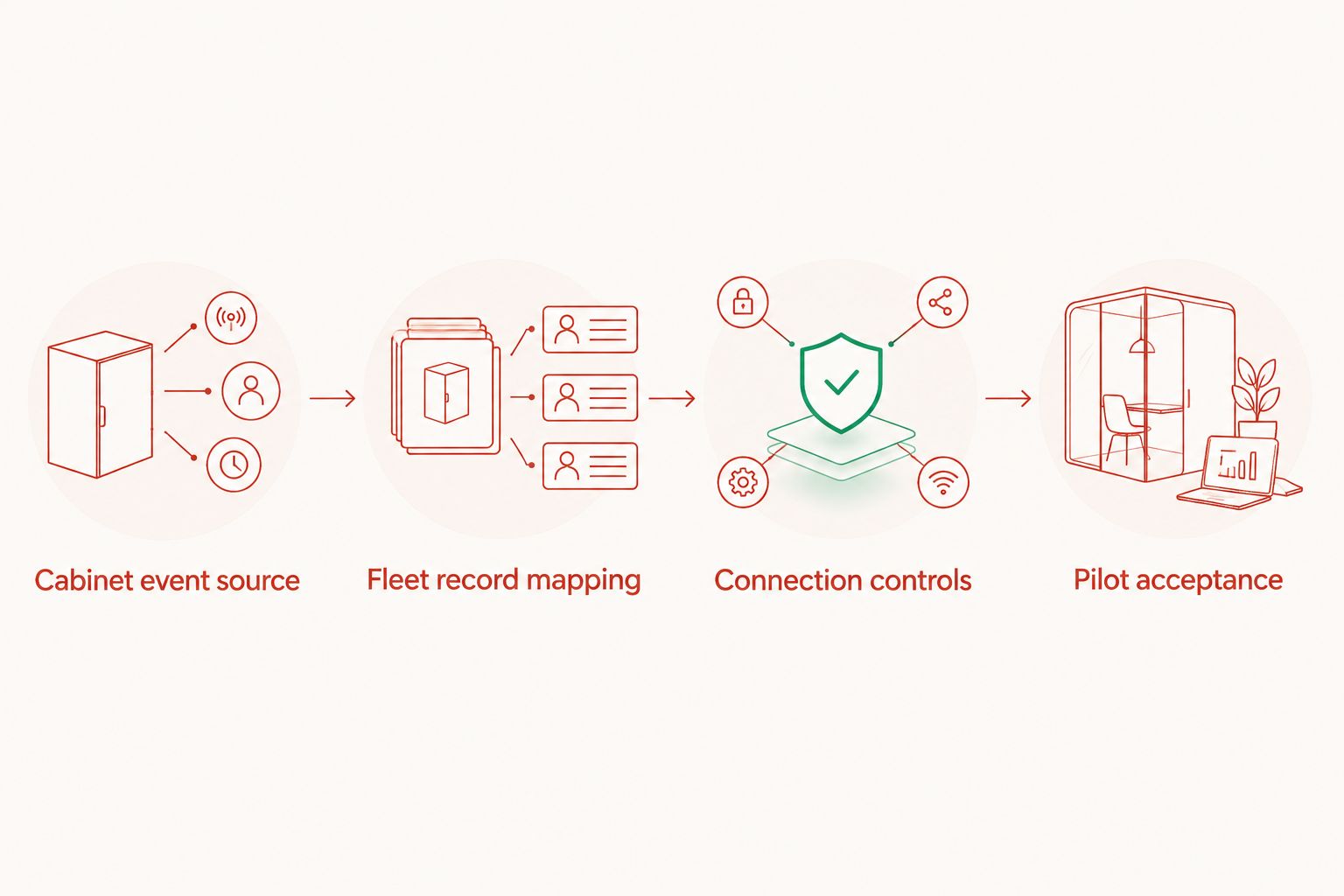
Connection controls
- Create a dedicated integration identity using the authentication method documented by each supplier. Grant only the permissions required for the selected workflow.
- Store credentials in an approved secrets store rather than a spreadsheet, shared document or source-code file. Document who can rotate credentials and recover the connection.
- Configure event delivery using the supplier's documented settings. For webhooks, apply the documented authenticity checks; for polling, follow the published request limits and pagination rules.
- Prevent duplicate processing. Use the source event ID where available, and retain a processing record so retrying delivery does not create another checkout.
- Define failure handling before enabling writes. Keep failed events for review and retry, preserve their original timestamps, and alert a named owner when processing stops.
Expected result: An authorised event produces the intended fleet update, repeated delivery does not duplicate it, and failed delivery remains recoverable.
Button names and configuration fields depend on the cabinet software and fleet platform. Follow the exact labels in those suppliers' documentation rather than substituting generic menu names from an unrelated guide.
For a 2026 handover, record the tested software versions, authentication method, permission scope and support contacts. Do not include secret values in the handover document.
Pilot acceptance
- Run the pilot with 1 vehicle and 2 named users before adding the rest of the fleet. Confirm that the physical key, cabinet record and fleet record agree after each action.
- Test 3 custody scenarios: a normal checkout and return, a key left out beyond its expected return, and a return by someone other than the original borrower. Decide how each should appear in your records.
- Replay an already processed event through your test process. Confirm that the destination retains the original transaction without creating a duplicate.
- Test an interruption using the supplier's supported test method or an isolated test connection. Restore service and confirm that missed events are reconciled without changing their occurrence times.
- Test an unknown key or user mapping. Confirm that the integration raises an exception rather than attaching the event to an unrelated vehicle.
- Obtain sign-off from the fleet manager and system administrator. Keep the previous custody process available until the pilot meets your written acceptance criteria.
Expected result: Your pilot demonstrates accurate attribution, recoverable failures and controlled exceptions—not just a successful connection message.
Keep the 2026 acceptance record with the integration documentation. Repeat the relevant tests after a controller replacement, authentication change or software upgrade that affects event handling.
Second workflow: review key access when a booking changes
A booking-driven workflow is a separate integration. Use it only when the fleet platform exposes booking changes and the cabinet system supports the required permission controls.
Treat a reservation as an access request, not proof that the vehicle is ready. Maintenance restrictions, existing key custody and local authorisation rules still need their own checks.
- Read the documented booking-created, booking-updated and booking-cancelled events, or query supported booking records.
- Match the booking's vehicle and driver to the existing mapping register. Reject incomplete or ambiguous matches.
- Apply the fleet's approval rules before creating any supported cabinet permission. Limit access to the intended key and booking period where the cabinet supports those restrictions.
- Reassess permission when the booking changes or is cancelled. Do not erase custody history or assume a cancelled booking means the key has returned.
- Test overlapping bookings and a driver change. If the cabinet cannot enforce the required restrictions, send an approval task to an authorised supervisor instead.
Expected result: Booking changes create a controlled access decision without bypassing custody records or vehicle restrictions.
The advantage is less repeated administration. The limitation is a greater dependency on accurate bookings and supported access controls; start with event reporting before adding permission changes.
Troubleshooting
The cabinet unlocks, but no key events appear
Check whether the hardware records individual-key movements at all. A digital lock can provide cabinet access without identifying removed keys; use supervised sign-out or suitable key-tracking hardware rather than converting door openings into checkout events.
Events attach to the wrong vehicle
Inspect the mapping register for reused slots, duplicate descriptions or registration-based joins. Correct the permanent key-to-vehicle mapping, then review affected transactions while retaining a record of the correction.
The fleet record shows duplicate checkouts
Check whether retries or overlapping polling results are being processed as new events. Deduplicate using the source event identifier and make destination writes safe to repeat; investigate existing duplicates before deleting records.
Returns appear before removals
Compare occurrence times, receipt times and timezone handling. Queue unmatched returns for reconciliation instead of forcing them against the latest checkout, and use documented source sequencing where available.
Updates stop after working during the pilot
Check credential validity, integration permissions, network reachability and supplier error responses. Restore access through the approved process, then reconcile from the last confirmed event rather than assuming the connection recovered every missed transaction.
Customise your workflow
Expand reporting before expanding control. Add a named owner for overdue-key exceptions, a process for lost keys and a review of users who no longer require access.
For BUYASAFE key cabinet selection, assess storage and integration separately: physical organisation is useful, but fleet automation depends on verified event and software capabilities. A cabinet that suits supervised handovers is not automatically suitable for unattended vehicle allocation.
Your next 2026 improvement should address the pilot's actual exceptions. If unidentified users cause problems, fix identity mapping; if staff return keys to incorrect locations, fix the physical return process before adding more automated rules.
FAQ
Can I connect any key cabinet to a fleet management system?
No. Automated key-custody updates require a cabinet that exposes identifiable key events and a fleet platform that accepts the required records. A conventional cabinet can still support a manual sign-out process.
Does an electronic cabinet lock mean it has an API?
No. Electronic locking describes how access is controlled, not whether software integration exists. Confirm the exact model's documented interfaces and event capabilities.
What information should a key checkout send to fleet software?
Send the permanent key identifier, mapped vehicle identifier, identified user, event type and occurrence time. Retain the source event identifier where available to prevent duplicate processing.
Can a key return automatically make a vehicle ready for its next booking?
A key return should not by itself mark a vehicle ready. Key custody does not establish that maintenance, cleaning, inspection or other release requirements have been completed.
Can I use a spreadsheet instead of an API?
Yes, a spreadsheet can support manual custody recording or compatible file imports. It does not create automatic key detection, and imported records need validation and duplicate checks.
What happens if the cabinet loses its network connection?
The outcome depends on the cabinet's documented offline behaviour. Confirm event retention, local access rules and recovery procedures, then test reconciliation before relying on the connection.
Does BUYASAFE confirm fleet integration for every key cabinet?
Do not assume fleet integration from a key cabinet listing or electronic lock description. Verify the exact cabinet model's interfaces with its manufacturer and confirm compatibility with your fleet software before selecting it.
One last thing
A returned key proves neither that the vehicle is on site nor that it is ready to drive. Keep key custody, vehicle location and operational readiness as separate records, and connect them only through explicit rules your team has approved.


