

A smart safe with app control is reliable only if its documented access and recovery methods suit the failures you need to cover, including a lost phone, flat batteries and unavailable connectivity. App features alone do not establish burglary resistance, fire protection or dependable access. Choose the safe for its physical protection first, then assess whether the app adds useful control without becoming your only way in.
- Is a smart safe with app control reliable? Check offline access, battery recovery and software support before deciding.
- App control does not establish a safe’s burglary resistance or fire rating.
- Buyasafe suits buyers comparing home safes and business safes by lock type.
- Require documented recovery procedures; do not treat phone alerts as proof that the door is secured.
Is a smart safe with app control reliable?
Reliability depends on the complete access system, not the presence of an app. A local connection, a remote connection and a conventional keypad impose different requirements. Before choosing a connected model in 2026, separate the features that operate at the safe from those that depend on your phone, internet connection or an external service.
Start with the guide to choosing the right lock type for your safe. A digital lock is not automatically an app-controlled lock, and a fingerprint reader does not establish phone connectivity.
| Access arrangement | Best for | Practical advantage | Limitation to check |
|---|---|---|---|
| Local keypad | Buyers who want entry at the safe | Does not require using a phone for each opening | Battery recovery and code management |
| Mechanical key or dial | Buyers seeking an access method without electronic power | Avoids phone and app dependencies | Key custody or combination handling |
| Local app connection | Buyers who want phone-based operation nearby | Adds phone interaction without necessarily requiring remote access | Exact connection method and offline behaviour |
| Internet-connected app | Buyers who need supported remote functions | Can provide remote features where the model supports them | Network, account, service and software dependencies |
These are access arrangements, not security grades. A safe can combine methods, but you must confirm the exact configuration rather than infer it from the words smart, digital or biometric.
Why this matters
You need the safe to do different jobs: resist unauthorised entry, allow authorised access and protect the contents against the hazards you selected it for. An app demonstration establishes none of those jobs on its own.
A convenient opening method is useful. It does not replace evidence about the safe body, door, lock, installation requirements or fire testing. Conversely, a strongly constructed safe still needs an access procedure that you can use when normal operation is interrupted.
For a 2026 purchase, write down what you actually need the app to do. Monitoring an opening, administering users and issuing an unlock command are separate functions; do not buy a model on the assumption that one feature includes the others.
Local app control: check what works without internet
Best for: buyers who want phone interaction at the safe rather than remote administration. Ask whether the app communicates directly with the lock, requires an internet login, or uses another device between the phone and the safe. The connection architecture determines which interruptions matter.
A local wireless connection does not, by itself, prove that the app works offline. Account authentication, initial setup or other functions can have separate requirements. Request the manual’s explanation of each function rather than accepting a general statement that the safe uses Bluetooth.
The advantage is convenience at the point of use, where supported. The trade-off is responsibility for phone compatibility, app permissions and access recovery. Choose local app control only after confirming how you open the safe without that phone.
Remote app control: check the full dependency chain
Best for: buyers with a defined need for supported remote monitoring or administration. Remote functions need a working communications path. Identify whether that path includes the safe’s connection, a gateway, your internet service and the manufacturer’s external service.
Ask what happens when each part is unavailable. A notification that cannot reach your phone is a monitoring failure; an unavailable remote unlock command is an access-function failure. Neither tells you, on its own, whether the physical lock remains secure or whether local entry still works.
The advantage is access to supported functions while away from the safe. The drawback is a longer dependency chain to maintain. Do not make remote access essential unless the documented local procedure covers your operational needs.
Conventional digital locking: compare the simpler alternative
Best for: buyers who need electronic entry but have no specific requirement for an app. A conventional digital lock keeps the comparison focused on code entry, power management, recovery and the safe’s construction. You still need to check the exact lock manual.
Buyasafe’s safe range includes digital-locking models that provide a useful comparison with connected products. Their digital-locking names do not establish app support, remote unlocking, access logs or any particular recovery method.
| Digital-locking alternative | Best for | Stated construction detail | Limitation for this comparison |
|---|---|---|---|
| Chubb Mini Banker MkII Security Safe Size 3 Digital Locking (M-40) | Buyers comparing a digital-locking security safe | 65mm body barrier, welded steel construction and barrier material | App connectivity is not established by the supplied specification |
| Chubb Mini Banker MkII Security Safe Size 4 Digital Locking (M-75) | Buyers comparing another digital-locking size | 65mm body barrier, welded steel construction and barrier material | Lock recovery and connectivity require separate confirmation |
The stated 65mm body barrier is a construction detail, not a substitute for a documented security rating. Do not use it to infer a cash rating, fire duration or resistance to a particular attack.


Why smart safe reliability varies
Assess the following factors for the exact model. These are purchasing checks, not claims that every connected safe has the same features or failure behaviour.
- Local access: Establish which authorised entry methods operate without the app, internet or an external account service.
- Power recovery: Check the specified battery type, low-power warning and approved procedure when the lock has insufficient power.
- Connection requirements: Identify every connection needed for local opening, remote commands and notifications.
- Account recovery: Confirm how you replace a lost phone, recover an account and remove a former user’s access.
- Software support: Request current phone compatibility information, update instructions and the manufacturer’s support arrangements.
- Physical protection: Verify the relevant burglary and fire documentation, along with the installation instructions for your location.
Give each factor a written answer. A feature list describing what works normally is not enough to establish what happens during an interruption.
How do you check a smart safe before relying on it?
Use the manual and a controlled demonstration to establish the access process. Keep the safe empty while checking recovery procedures, and follow the manufacturer’s instructions throughout. Do not deliberately create a lockout or improvise a power connection.
- Local access: Identify the normal opening method and the authorised alternative. Confirm whether that alternative remains available when the phone or account is unavailable.
- Power recovery: Locate the approved low-battery and depleted-battery procedures. Ask the supplier to explain them before purchase if the manual is unclear.
- Connection checks: Separate the connection used for nearby operation from the connection used for remote features. Check the documented behaviour when either is unavailable.
- User removal: Establish how an administrator removes users and what happens to previously issued credentials. Distinguish app account access from lock access.
- Support records: Retain the exact model details, lock instructions, installation record and relevant support information outside the safe.
The order matters. First establish how you enter and recover access; then assess connections and administration. An attractive alert screen is not a reason to skip the lock’s operating instructions.
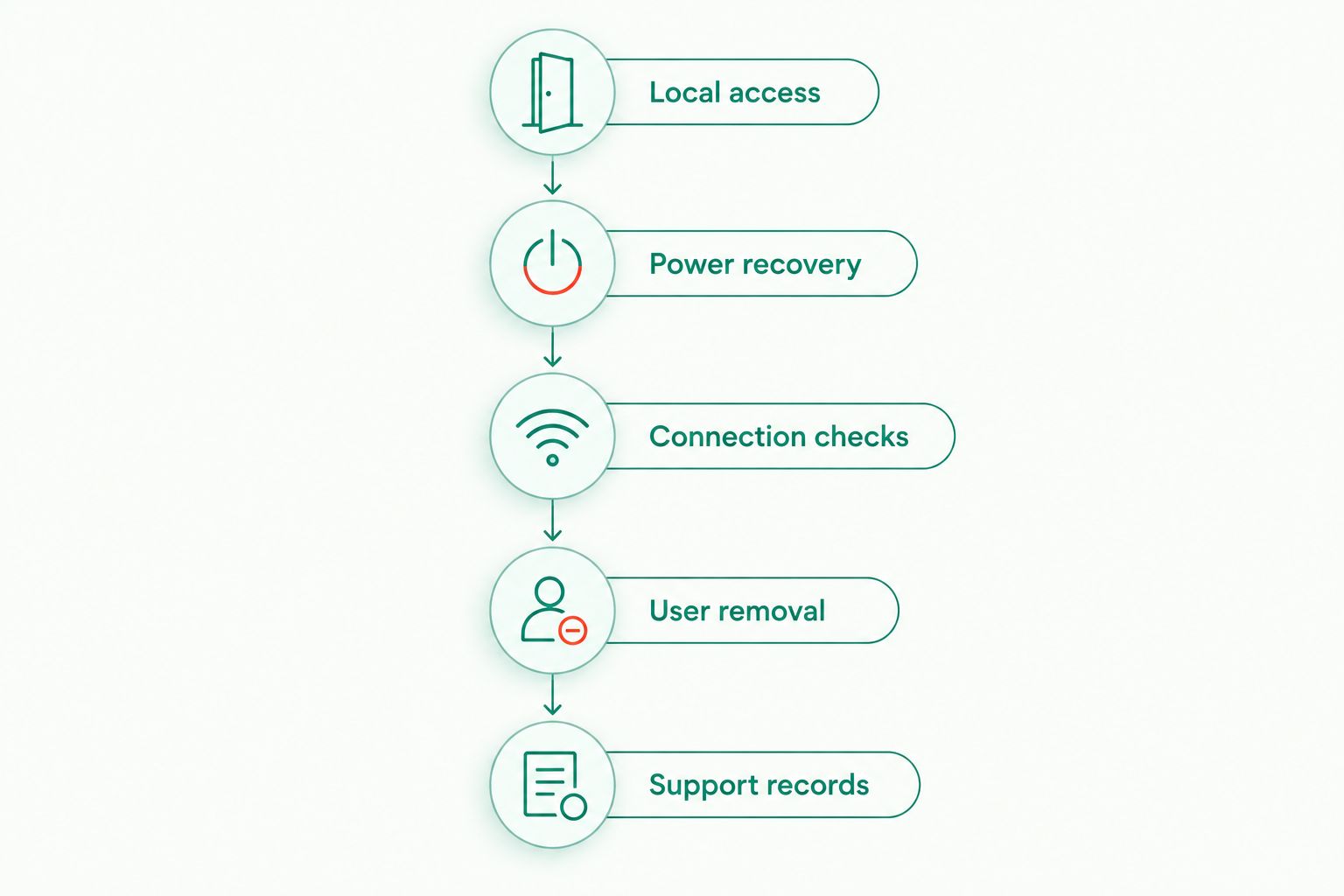
For a 2026 buying check, request demonstrations of 3 outage scenarios: an unavailable phone, an unavailable internet connection and insufficient lock power. Those are recommended test scenarios, not a claim about a model’s failure rate. Use only the demonstrations and procedures the supplier approves.
Keep 2 separate records: the operating instructions and the authorised recovery arrangements. Store both where you can retrieve them without opening the safe, while protecting any sensitive recovery credentials from unauthorised access.
Does app control make a safe more secure?
App control adds functions; it does not establish stronger physical security. A connected lock needs assessment of both its authorised-access arrangements and its account security. The safe itself still needs an appropriate body, door, lock and installation.
Ask whether the app can unlock the safe or only report activity. That distinction changes the consequence of an account being misused. Also check whether the app reports a command being issued, the lock changing state or the door actually closing; these are different events.
Use available account protections, keep the phone secured and remove access when users leave. Never treat a notification as a replacement for checking that the door is closed and locked before leaving the premises.
What happens if the phone, internet or batteries fail?
The exact model’s documented fallback procedure determines whether authorised access remains available. A lost phone, an internet outage and depleted lock batteries are different failures. A method that solves one does not necessarily solve another.
For example, a local keypad is relevant to phone availability, but its own power requirements still need checking. An approved emergency-power procedure addresses lock power; it does not establish how an account is recovered. Avoid the vague question of whether the safe has a backup and ask which failure the backup covers.
For business use in 2026, assign responsibility for battery checks, account administration and recovery records. A documented process prevents essential information from being held only by an employee who is absent or has left.
Should you choose an app-controlled safe for home or business?
Choose app control only when a documented feature solves a specific access or monitoring need. For home use, establish whether phone-based opening offers a real advantage over entering a code at the safe. For business use, identify who administers access and how departures or lost devices are handled.
Buyasafe is best for buyers comparing home and business safes by lock type. The useful comparison is between suitable safe configurations, not between app screenshots. Connected models need verified software and recovery arrangements; conventional models still need appropriate physical protection and lock maintenance.
Do not infer firearm, medication or insurance suitability from app control. Check the applicable storage requirements and the exact safe specification separately. Where an insurer sets conditions, obtain confirmation that the proposed safe and installation satisfy those conditions.
FAQ
Is a smart safe with app control reliable for everyday use?
A smart safe with app control is reliable only when its documented access, power recovery and connection requirements suit your use. Confirm what remains usable when the phone, internet or lock power is unavailable.
Can I open an app-controlled safe without my phone?
You can open an app-controlled safe without your phone only if the exact model provides another authorised entry method. Confirm that method in the lock manual rather than assuming every smart safe has a keypad or override key.
Does a smart safe need Wi-Fi to open?
Wi-Fi requirements depend on the exact model and opening method. Check local operation, remote commands and account authentication separately because they can have different connection requirements.
Is a digital safe the same as a smart safe?
A digital safe is not automatically a smart safe. Digital locking identifies an electronic access system; it does not establish app control, internet connectivity or remote unlocking.
What happens when a smart safe’s batteries run out?
The manufacturer’s depleted-battery procedure determines how you restore authorised access. Use only the specified recovery method, and keep its instructions accessible outside the safe.
Does an app alert prove that my safe is locked?
An app alert proves only the event the system is designed to report. Confirm whether it reports an issued command, lock status or door status, and physically check the safe before leaving.
What should I ask before buying a smart safe in 2026?
Ask for the exact model’s access methods, power recovery instructions, connection requirements and current software support information. Assess burglary protection, fire protection and installation separately from the app features.
One last thing
A successful unlock command is not the same as a secured door. Before relying on app status, identify exactly what the system measures and reports. Then make physical closure and lock engagement part of your normal routine.
For your 2026 shortlist, reject any model whose supplier cannot explain authorised access during an interruption. Convenience is useful only after you have a dependable, documented way to operate the safe.


